Finding the right ergonomic mouse is tough enough, but for left-handers with smaller hands, the search can feel impossible. Standard mice can cause wrist strain and discomfort, while most ‘ergonomic’ options are built for righties with larger grips. That’s where the niche but essential left-handed vertical mouse for small hands comes in. After testing and analyzing dozens of models, we’ve identified the top contenders for 2025 that deliver comfort, precision, and pain-free productivity for southpaws.
🚀 Quick Verdict: Best Overall
SANWA Wired Left Handed Ergonomic Mouse
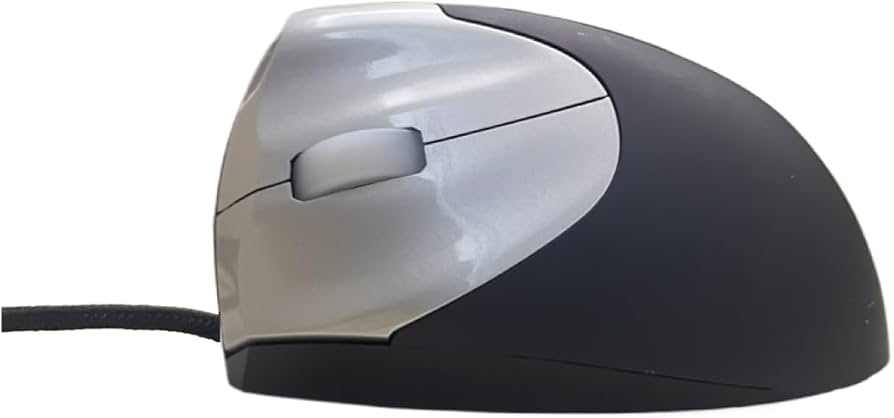
Its compact, purpose-built design is specifically engineered for smaller hands, offering an unmatched level of comfort and control right out of the box.
Comparison of the Best Lefty Vertical Mice for Small Hands
| Product | Connectivity | DPI Settings | Best For |
|---|---|---|---|
| SANWA Wired Left Handed Mouse | Wired (USB-A) | 1000 / 1600 | Overall Comfort |
| J-Tech Digital Left Handed Wireless | Wireless (2.4GHz) | 800 / 1200 / 1600 | Customizable Support |
| SUNGI Left-Handed Mouse | Wireless (2.4GHz) | 800 / 1200 / 1600 | Budget Pick |
| DeLUX Left Handed Vertical Mouse | Wireless + Bluetooth | Up to 4000 | Power Users |
In-Depth Reviews for 2025
1. SANWA Wired Left Handed Ergonomic Mouse
Pros
- Perfectly scaled for small hands
- Reliable, lag-free wired connection
- Lightweight and easy to maneuver
- Plug-and-play simplicity
Cons
- Wired design limits portability
- Fewer DPI settings than competitors
The Lowdown
The SANWA is our top pick for a simple reason: it’s one of the few vertical mice designed from the ground up specifically for left-handers with smaller hands. It doesn’t just shrink a standard design; it contours perfectly to a smaller palm, ensuring all buttons are within easy reach. The ‘handshake’ grip feels natural and immediately alleviates wrist pressure. The wired connection means you never have to worry about batteries or signal dropouts, making it a dependable workhorse.
Key Specs
- Connectivity: Wired (USB-A)
- DPI: 1000/1600 (switchable)
- Sensor: Blue LED
- Buttons: 6 (including forward/back)
Sentiment Analysis
Users consistently praise this mouse as a ‘game-changer’ for wrist pain (RSI). The most common positive feedback is about the size, with many stating it’s the first mouse that has ever felt truly comfortable for their small hands. The main critique is the lack of a wireless option, but most agree it’s a worthy trade-off for the superior ergonomics.
2. J-Tech Digital Left Handed Wireless Ergonomic Mouse
Pros
- Wireless freedom (2.4GHz)
- Removable palm rest for custom comfort
- Three adjustable DPI levels
- Soft-touch matte finish
Cons
- Slightly larger than the SANWA
- Requires AAA batteries (not rechargeable)
The Lowdown
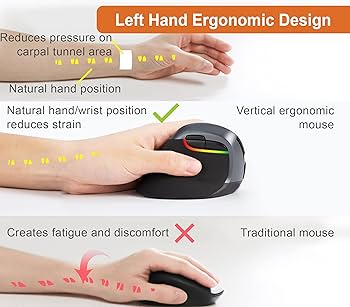
The J-Tech Digital offers a fantastic wireless alternative with a unique trick up its sleeve: a removable palm rest. This allows you to customize the fit. For smaller hands, using it without the palm rest often provides a more secure and comfortable grip. It’s a well-rounded option that balances ergonomic design with the convenience of a clutter-free wireless setup.
Key Specs
- Connectivity: Wireless (2.4GHz USB dongle)
- DPI: 800 / 1200 / 1600
- Power: 2 x AAA Batteries
- Buttons: 5
Sentiment Analysis
Feedback is largely positive, with users loving the wireless functionality and adjustable feel. Some users with very small hands find it a touch bulky even without the palm rest, but for most, it hits a sweet spot. The need for disposable batteries is a minor but frequently mentioned downside.
3. SUNGI Left-Handed Mouse
Pros
- Excellent value for the price
- Compact and lightweight design
- Responsive and easy to set up
- Energy-saving sleep mode
Cons
- Build materials feel less premium
- Scroll wheel can be less precise
The Lowdown
If you want to try a vertical mouse without a big investment, the SUNGI is your best bet. It delivers the core ergonomic benefits in a compact, wireless package at a fraction of the cost of premium brands. Its size is well-suited for small to medium-sized left hands. While it may lack the refined feel of more expensive models, its performance is surprisingly solid for everyday office tasks.
Key Specs
- Connectivity: Wireless (2.4GHz USB dongle)
- DPI: 800 / 1200 / 1600
- Power: 2 x AAA batteries
- Buttons: 6
Sentiment Analysis
Reviewers are consistently impressed with the value proposition, calling it the best ‘budget’ ergonomic mouse for lefties. Many have purchased it as a trial mouse and ended up using it full-time. Criticisms are minor, usually focusing on a ‘cheaper’ plastic feel compared to Logitech or DeLUX, which is expected at this price point.
4. DeLUX Left Handed Ergonomic Vertical Mouse
Pros
- Dual Mode: 2.4G Wireless + Bluetooth
- Rechargeable via USB-C
- High-precision sensor with up to 4000 DPI
- OLED screen for status display
Cons
- Highest price in our list
- May be too large for very petite hands
The Lowdown
For the left-handed power user, the DeLUX is packed with features. The dual-mode connectivity is a standout, allowing you to switch between devices seamlessly. The rechargeable battery and high-DPI sensor make it suitable for demanding tasks like graphic design or gaming. Its innovative OLED screen, which displays battery life and connection mode, is a premium touch. However, this feature-rich design comes in a slightly larger shell, making it best for those on the upper end of the ‘small hands’ spectrum.
Key Specs
- Connectivity: Wireless (2.4GHz) & Bluetooth 4.0
- DPI: 800 / 1200 / 1600 / 2400 / 4000
- Power: Rechargeable 1000mAh Battery (USB-C)
- Buttons: 6
Sentiment Analysis
Users who fit this mouse well absolutely love it, praising its premium build, long battery life, and versatile connectivity. The main point of caution in reviews is the size; several users confirm that if your hands are truly petite, the thumb buttons might be a stretch. It’s best for users who find other ‘small’ mice to be just a bit too tiny.
Buying Guide: How to Choose the Right Mouse
Navigating the world of niche ergonomics can be tricky. Keep these key factors in mind to make the perfect choice.
1. Size and Grip Are Everything
This is the most critical factor. A mouse that’s too big will force you to stretch your fingers, defeating the ergonomic purpose. Look for models explicitly marketed as ‘small’ or ‘compact’. A good rule of thumb: measure your hand from the base of your palm to the tip of your middle finger. If it’s under 7 inches (17.5 cm), you are firmly in the ‘small hands’ category and should prioritize compact models like the SANWA.
2. Wired vs. Wireless vs. Bluetooth
Wired: Offers a reliable, lag-free connection and never needs batteries. The trade-off is cord clutter and limited range. Best for a fixed desk setup.
Wireless (2.4GHz): Uses a USB dongle for a clean, cable-free desk. Great for portability and general use. Be mindful of battery life (rechargeable vs. disposable).
Bluetooth: Connects directly to your device without a dongle, freeing up a USB port. Ideal for laptops and tablets. The DeLUX model offers both for ultimate flexibility.
3. DPI (Dots Per Inch)
DPI measures mouse sensitivity. A higher DPI means the cursor moves further on the screen with less physical mouse movement. For standard office work, a range of 800-1600 DPI is perfectly adequate. For tasks requiring high precision like graphic design or gaming, a higher adjustable DPI (like the 4000 on the DeLUX) is a significant advantage.
Frequently Asked Questions
Why should I use a vertical mouse?
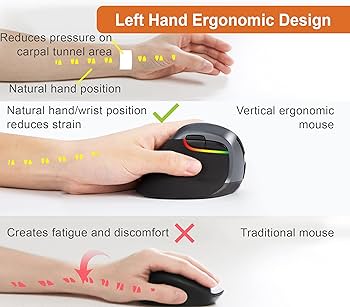
A vertical mouse promotes a neutral ‘handshake’ wrist and forearm posture. This reduces the twisting of your ulna and radius bones, alleviating the pressure that can lead to repetitive strain injury (RSI) and carpal tunnel syndrome over time. It feels more natural and is significantly more comfortable for long work sessions.
How do I know if I have ‘small hands’ for a mouse?
While there’s no universal standard, a common guideline is to measure your hand length (wrist to middle fingertip) and width (across the palm). If your hand length is below 7 inches (~17.5 cm), you will likely find compact or ‘small’ mice much more comfortable and easier to control.
How long does it take to get used to a vertical mouse?
For most people, the adjustment period is surprisingly short, typically ranging from a few hours to a couple of days. Initially, your cursor control might feel a bit clumsy as you’re using different muscle groups. But once you adapt, the comfort benefits become immediately apparent, and going back to a flat mouse will feel strange.