
🚀 Quick Verdict / Top Pick
J-Tech Digital Left Handed Wireless Ergonomic Mouse
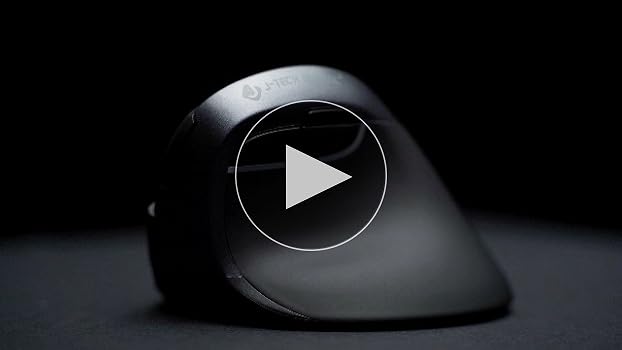
Offering the perfect blend of wireless freedom and a comfortable ‘handshake’ grip truly sized for smaller hands, this is our top choice for all-day southpaw comfort in 2025.
Finding an ergonomic mouse as a left-hander is tough. Finding one that’s also a vertical mouse AND designed for smaller hands feels almost impossible. The standard ‘one-size-fits-all’ approach leaves you with a mouse that’s too bulky, causing more strain than it solves. We’ve tested the top contenders for 2025 to find the southpaw solutions that actually deliver on the promise of comfort and control for petite hands. Here are the winners.
| Product | Connectivity | DPI Range | Best For |
|---|---|---|---|
| SANWA Wired Left Handed | Wired USB | 1000/1600 | No-Fuss Reliability |
| J-Tech Digital Wireless | Wireless 2.4GHz | 800/1200/1600 | Overall Comfort |
| SUNGI Left-Handed Mouse | Wireless 2.4GHz | 800/1200/1600 | Budget & Portability |
| DeLUX Left Handed Vertical | Wireless 2.4GHz | 800-2400 | Precision & Features |
2025’s Top Left-Handed Vertical Mice: In-Depth Reviews
1. SANWA Wired Left Handed Ergonomic Mouse
Pros
- Never needs batteries or charging
- Compact frame fits small hands well
- Simple plug-and-play setup
Cons
- Wired connection limits mobility
- Basic DPI settings
The Lowdown
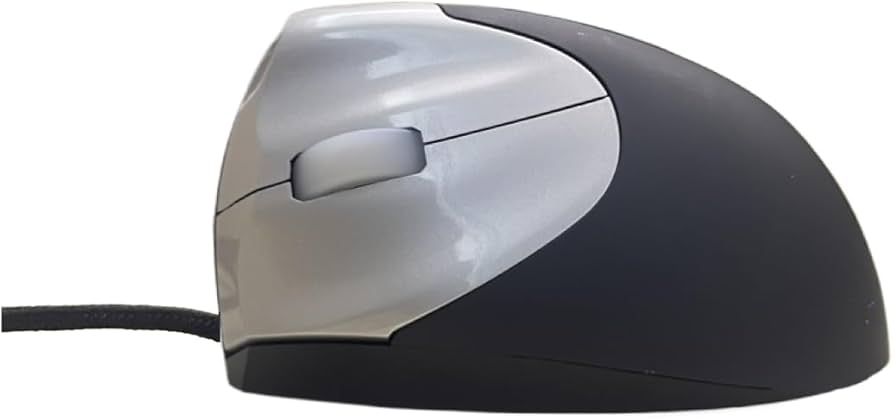
The SANWA is a no-fuss, wired vertical mouse designed specifically for lefties with smaller hands. It’s a reliable workhorse for a static desk setup where you want to eliminate any concerns about battery life or connection dropouts. Its smaller frame is ideal for users who find standard ergonomic mice too bulky and cumbersome.
Key Specs
- Connectivity: Wired USB
- DPI: 1000/1600 (switchable)
- Buttons: 6
Sentiment Analysis
Users appreciate its simplicity and the fact that it just works without driver issues or battery concerns. The fit for smaller hands is frequently praised as a major plus. The main complaint is the restrictive nature of the cord in modern, clean desk setups. Dealbreaker: The non-detachable wire is a complete non-starter if you need a clean, portable, or flexible workspace.
2. J-Tech Digital Left Handed Wireless Ergonomic Mouse (Top Pick)
Pros
- Excellent ergonomic fit for small hands
- Reliable 2.4GHz wireless connection
- Adjustable DPI for workflow flexibility
Cons
- Requires 2x AAA batteries (not included)
- Build quality feels adequate, not premium
The Lowdown
The J-Tech Digital V628L hits the sweet spot for the vast majority of left-handed users with small to medium hands. It provides an immediate sense of relief with its comfortable ‘handshake’ grip, all while being untethered by wires. With three DPI settings, it offers enough flexibility for both standard office work and casual browsing, making it our top all-rounder.
Key Specs
- Connectivity: Wireless (2.4GHz USB Receiver)
- DPI: 800/1200/1600 (switchable)
- Power: 2x AAA batteries
Sentiment Analysis
Owners overwhelmingly praise the instant comfort and relief from wrist pain, with the compact size being a consistent highlight. It’s often cited as the ‘just right’ fit. The main complaint revolves around the hassle of replacing batteries and the somewhat basic feel of the plastic shell. Dealbreaker: If you absolutely cannot stand dealing with disposable batteries, look for a wired or rechargeable option.
3. SUNGI Left-Handed Mouse
Pros
- Very affordable price point
- Extremely compact and lightweight for travel
- Quiet clicks are great for shared spaces
Cons
- Build quality feels less durable
- May be *too* small for some
The Lowdown
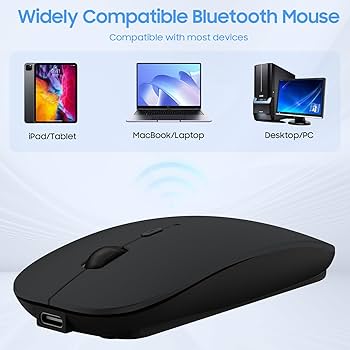
The SUNGI is a highly portable and affordable entry into left-handed ergonomics. It’s small enough to slip into any laptop bag, making it a fantastic travel companion or a backup mouse. While it lacks the premium feel of other options, it delivers on the core promise of wrist-saving comfort for small-handed southpaws without breaking the bank.
Key Specs
- Connectivity: Wireless (2.4GHz USB Receiver)
- DPI: 800/1200/1600 (switchable)
- Power: 2x AAA batteries
Sentiment Analysis
Users love the price and the silent click feature, making it a favorite for quiet environments like libraries or open offices. Many buy it specifically for its portability. Predictably, some find the build quality to be a clear reflection of its low price point, feeling a bit flimsy. Dealbreaker: Its tiny size, while great for travel, might feel insubstantial and lack proper palm support for all-day use, even for small hands.
4. DeLUX Left Handed Ergonomic Vertical Mouse
Pros
- Higher DPI range (up to 2400)
- Includes a removable wrist rest for support
- Solid and satisfying build quality
Cons
- Slightly larger, pushing the limit for ‘small’ hands
- Wrist rest can be awkward for some
The Lowdown
The DeLUX elevates the experience with a more premium feel and higher performance. The inclusion of a detachable wrist rest adds a layer of customizable comfort, and the higher DPI ceiling is perfect for tasks requiring pixel-perfect precision, like photo editing or gaming. It’s a clear step up in features for those who demand more than just the basics.
Key Specs
- Connectivity: Wireless (2.4GHz USB Receiver)
- DPI: 800/1200/1600/2400 (switchable)
- Features: Removable wrist rest, 6 buttons
Sentiment Analysis
Positive feedback centers on the smooth tracking, solid clicks, and the added comfort from the wrist rest. Many users feel it offers features typically found on more expensive ergonomic mice. The main critique is that it borders on a medium size, which can be a stretch for users with truly petite hands. Dealbreaker: If your hand measures less than 6.5 inches from wrist to middle fingertip, the slightly larger frame might force an uncomfortable stretch.
Frequently Asked Questions
Why should I even use a vertical mouse?
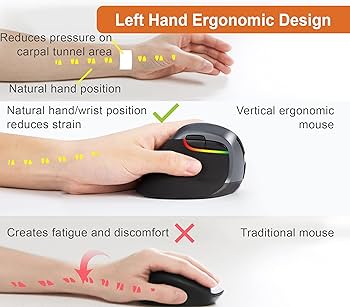
A vertical mouse keeps your wrist and forearm in a natural ‘handshake’ position. This prevents the twisting of your forearm bones (pronation) that occurs with a traditional mouse, reducing strain on muscles and tendons and helping to prevent or alleviate conditions like carpal tunnel syndrome and repetitive strain injury (RSI).
How do I know if I have ‘small hands’ for a mouse?
A simple measurement is the best guide. Measure from the crease at the base of your wrist to the tip of your middle finger. If this measurement is 7 inches (17.5 cm) or less, you fall into the small hand category for most mouse manufacturers and will benefit from the models on this list.
Is a higher DPI always better?
Not at all. Higher DPI means the cursor moves further on the screen for a smaller physical movement of the mouse. While gamers and designers with large 4K monitors might prefer a high DPI (2000+), many office users find it too sensitive and prefer a lower setting (1000-1600) for more controlled movements.
Will a left-handed vertical mouse feel weird at first?
Yes, absolutely. Expect an adjustment period of a few days to a week. Your hand and brain are used to a lifetime of using a different type of mouse. It may feel clumsy initially, but stick with it; the long-term ergonomic benefits are worth the short learning curve.
Read More on TechForDesk
- The 4 Best Left Handed Vertical Mice for Small Hands in 2025
- The 3 Best Left-Handed Vertical Mice for Small Hands (2024)
- The 4 Best Grovemade Desk Shelf Alternatives (That Look Just as Good)
- Best Candlestick Lamps: A Curated Guide to Styles, Placement, and Transformations
- Top 3 Lamp Shades for Candlestick Lamps: A Curated Guide




