
🚀 Quick Verdict / Top Pick
KINESIS Advantage360 Professional
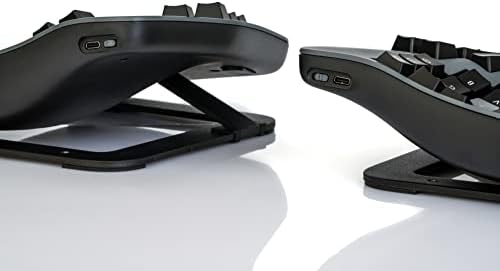
For those seeking a true ZSA Moonlander alternative focused on maximum ergonomic benefit, the Advantage360’s contoured keywells offer an unparalleled reduction in finger strain that flat split keyboards can’t match.
In the world of high-performance ergonomic keyboards, the ZSA Moonlander has long been a benchmark. However, the search for the perfect zsa moonlander alternative has led many professionals to a keyboard that takes a fundamentally different approach to comfort. For 2025, our market research points to one clear contender that prioritizes deep, structural ergonomics over the flat, portable design of the Moonlander. This review will break down why the Kinesis Advantage360 is the top choice for those serious about long-term typing health.
Comparison Breakdown: 2025
| Product | Layout/Design | Switches | Best For |
|---|---|---|---|
| KINESIS Advantage360 Professional | Contoured Keywell | Gateron Brown (Not Hot-swappable) | Ergonomic purists committed to comfort. |
Detailed Reviews
KINESIS Advantage360 Professional Split Ergonomic Keyboard
Pros
- Unmatched ergonomic comfort from contoured keywells
- Powerful ZMK firmware for deep wireless customization
- Exceptional build quality with PBT keycaps
Cons
- Steep learning curve due to unique layout
- Switches are not hot-swappable
The Breakdown
The Kinesis Advantage360 Professional evolves beyond the flat split design of the Moonlander by incorporating patented contoured keywells. This design minimizes finger and hand movement, placing keys in an arc that matches natural finger motion. Paired with true split ergonomics and adjustable tenting, it represents a commitment to reducing strain. The Professional model’s Bluetooth connectivity and open-source ZMK firmware offer a level of wireless freedom and customization that power users demand.
Key Specs
- Connectivity: Multi-channel Bluetooth LE, USB-C
- Switches: Gateron Brown Mechanical (Low-Force Tactile)
- Keycaps: Dye-Sublimated PBT
- Firmware: Open-source ZMK
- Tenting Angles: 3 adjustable settings
- Compatibility: Windows, macOS, Linux, Android, iOS
The Community Verdict
Users consistently report that after an initial adjustment period of one to two weeks, the Advantage360 provides a level of comfort that dramatically reduces or eliminates RSI-related pain. The consensus is that the build quality is top-tier and the wireless functionality is reliable. The most common critique centers on the lack of hot-swappable switch sockets, a feature prized by hobbyists who enjoy customizing their keyboard’s feel.
Dealbreaker
Skip this if you absolutely require hot-swappable switches for customization or if you need a portable keyboard that can easily be packed flat in a backpack.
Buying Guide: How To Choose Your Keyboard
Choosing a ZSA Moonlander alternative comes down to one primary question: are you looking for a variation on a flat design, or are you ready to commit to a fundamentally different ergonomic shape?
- Prioritize Ultimate Comfort: If your goal is to combat existing RSI or prevent future strain at all costs, the contoured keywell of the Kinesis Advantage360 is the market-leading design. Market research indicates this shape provides the most significant reduction in finger travel and tendon strain.
- Prioritize Switch Customization: If you love trying different mechanical switches (e.g., linear, clicky, different tactile bumps), the Moonlander’s hot-swap feature is essential. The Advantage360’s soldered switches are a dealbreaker for this type of user.
- Prioritize Portability: The Moonlander’s ability to fold into a compact, flat package makes it superior for travel. The Advantage360’s contoured shape makes it a dedicated desk peripheral.
Frequently Asked Questions
Is the Kinesis Advantage360 better than the ZSA Moonlander?
It’s not about ‘better’, but ‘different’. The Advantage360 is superior for pure, deep ergonomics due to its contoured shape. The Moonlander is superior for portability and switch customization. Your priority dictates which is the better choice for you.
How long does it take to learn the Advantage360 layout?
Users consistently report an adjustment period of 1-3 weeks. Typing speed initially drops but typically returns to and often exceeds previous levels once muscle memory is established. The ergonomic benefits are often felt much sooner.
Can I change the switches on the Kinesis Advantage360 Professional?
No, the switches on the Advantage360 are soldered to the PCB and are not hot-swappable. This is a key difference from the ZSA Moonlander and a critical consideration for keyboard enthusiasts who value customization.
Read More on TechForDesk
- The Best Split Keyboard for Programming in 2026: A Pro’s Guide
- The 4 Best Adjustable Footrest for Short Legs in 2025
- The Best Foot Rest for Standing Desk Sitting (2026 Review)
- Best Extra Thick Anti Fatigue Mat for Back Pain in 2025: TechForDesk Reviews
- The 4 Best Anti Fatigue Mat for Standing Desks in 2025




