

🚀 Quick Verdict / Top Pick
Mount-It! Clamp Keyboard Tray

It secures the top spot with its generous surface area and rock-solid clamp system, offering the best balance of stability and space for most users.
Achieving proper desk ergonomics is non-negotiable in 2025. For those looking to avoid drilling into their prized desktops, the under desk keyboard tray clamp on design is the definitive solution. These trays lower your keyboard and mouse to a neutral typing position, reducing strain on your wrists, shoulders, and neck. After extensive market research into user feedback, specifications, and brand reputation, we’ve curated the top models that deliver on stability, adjustability, and build quality.
| Product | Tray Dimensions | Tilt Range | Best For |
|---|---|---|---|
| Mount-It! Clamp Keyboard Tray | 25″ x 9.8″ | +15° / -15° | Overall Balance |
| Mount-It! Sit Stand Tray | 25.5″ x 9.75″ | +15° / -15° | Sit-Stand Desks |
| Kensington Clamp-On Tray | 20.08″ x 11.81″ | Up to -15° | Brand Trust & Simplicity |
| Kantek Desk Clamp Tilting Tray | 26.5″ x 11.5″ | 5 Fixed Positions | Maximum Tilt Control |
1. Mount-It! Clamp Keyboard Tray
Pros
- Expansive surface for full-size keyboard and mouse
- Robust C-clamp system provides excellent stability
Cons
- Limited vertical height adjustment
- Swivel mechanism can feel stiff initially
The Breakdown: The Mount-It! B07GQT1XVD is a market favorite for a reason. It nails the fundamentals with a large, non-slip tray surface and an impressively sturdy clamp that minimizes bounce during typing. Its simple slide-in/slide-out mechanism is smooth and reliable for daily use.
Key Specs:
- Tray Dimensions: 25″ W x 9.8″ D
- Max Desk Thickness: 1.57″
- Tilt Range: +15° / -15°
- Swivel: 180° Left/Right
- Material: Steel, Particle Board
The Community Verdict: Users consistently praise the easy, tool-free installation and the stability of the platform. The consensus is that it feels more premium than its price point suggests. Some users with thicker-than-average desks note the clamp size as a limitation to check before purchasing.
Dealbreaker: Skip this if you require significant vertical height adjustment for a sit-stand desk setup.
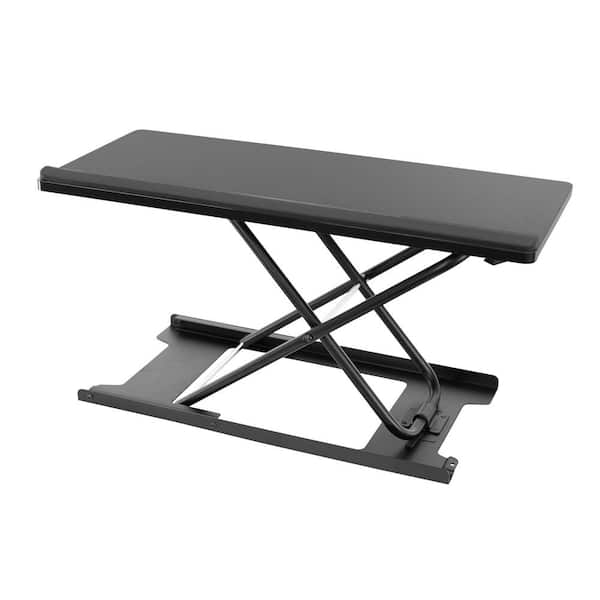
2. Mount-It! Sit Stand Keyboard Tray, Height Adjustable
Pros
- Exceptional height adjustment range (over 12″)
- Full 360° swivel for easy positioning
Cons
- Higher price point than standard models
- Can have more lateral wobble when fully extended
The Breakdown: This is Mount-It!’s premium offering, engineered specifically for adjustable-height desks. The gas spring arm allows for effortless vertical movement, ensuring your keyboard is at the perfect height whether you’re sitting or standing. It offers a complete ergonomic solution with extensive tilt, swivel, and height control.
Key Specs:
- Tray Dimensions: 25.5″ W x 9.75″ D
- Max Desk Thickness: 3.75″
- Tilt Range: +15° / -15°
- Height Adjustment Range: 12.6″
- Material: Steel, Aluminum
The Community Verdict: Market research indicates that owners of sit-stand desks find this model transformative for their workflow. The wide range of motion is the most praised feature. However, some report that the installation is more involved and that a slight wobble can be noticeable at maximum height extension.
Dealbreaker: Skip this if you have a fixed-height desk; the advanced features are overkill and not worth the extra cost.
3. Kensington Clamp-On Keyboard Tray

Pros
- Includes a comfortable gel wrist rest
- Simple, reliable clamp-on mechanism
Cons
- Tray surface is smaller than competitors
- Plastic components may feel less durable
The Breakdown: Kensington brings its legacy of ergonomic office supplies to this clamp-on tray. The standout feature is the integrated gel wrist rest, providing immediate comfort and support. The SmartFit system helps guide users to an ideal ergonomic height, making it a user-friendly choice for those new to ergonomic setups.
Key Specs:
- Tray Dimensions: 20.08″ W x 11.81″ D
- Max Desk Thickness: 1.5″
- Tilt Range: Up to -15°
- Height Adjustment: 3 preset levels
- Material: Plastic, Steel, Gel Wrist Rest
The Community Verdict: Owners often cite the comfort of the wrist rest and the easy setup as major positives. The consensus is that it’s a solid, dependable choice from a trusted brand. Some power users with large gaming keyboards and mice find the surface area slightly restrictive.
Dealbreaker: Skip this if you use a large, full-size mechanical keyboard and require ample space for low-sensitivity mousing.
4. Kantek Desk Clamp Tilting Keyboard Tray

Pros
- Five distinct, lockable tilt positions for precision
- Very generous tray surface area
Cons
- Build materials feel less robust than premium options
- Adjustment mechanism can be clunky
The Breakdown: The Kantek tray focuses on one thing: providing precise, lockable tilt angles. Its 5-position system allows users to find and set their ideal negative tilt for maximum wrist comfort. This model also boasts one of the largest tray surfaces, making it great for expansive setups on a budget.
Key Specs:
- Tray Dimensions: 26.5″ W x 11.5″ D
- Max Desk Thickness: 1.5″
- Tilt Range: 5 preset positions
- Height Adjustment: 3 preset levels
- Material: Plastic, Metal
The Community Verdict: Users who struggle with wrist pain often report that the specific tilt settings on the Kantek are a major benefit. Its large size is also frequently mentioned as a plus. Conversely, reports often mention that the build quality doesn’t inspire the same confidence as the Mount-It! models and that the adjustment knobs can be difficult to operate.
Dealbreaker: Skip this if you need smooth, on-the-fly adjustments or prioritize premium build quality and materials.
Buying Guide: How to Choose the Right Clamp-On Tray
Selecting the perfect under desk keyboard tray clamp on model comes down to four key factors:
1. Adjustability (The Ergonomic Core)
This is the primary reason to buy a tray. Look for height adjustment to lower the keyboard below elbow height and negative tilt (where the back of the keyboard is lower than the front) to keep wrists straight. Swivel is a bonus for repositioning.
2. Tray Size & Surface Area
Measure your keyboard and consider your mouse usage. A standard tray is around 25 inches wide, which is sufficient for a full-size keyboard and mouse. If you use a tenkeyless (TKL) keyboard, you’ll have more mouse room, but gamers with large mousepads should double-check dimensions.
3. Clamp Mechanism & Desk Compatibility
Before you buy, measure the thickness of your desk. Each tray has a maximum clamp thickness, typically between 1.5″ and 4″. Also, check for any bevels or support bars under your desk that could interfere with the clamp’s contact area.
4. Build Quality & Stability
A wobbly tray is distracting and counter-productive. Market research indicates that models with steel C-clamps and robust arms offer the best stability. While plastic components can reduce weight, a solid metal frame is the foundation of a bounce-free typing experience.
Frequently Asked Questions (FAQ)
1. Do clamp-on keyboard trays damage a desk?
Generally, no. Most quality trays come with padded contact points to protect the desk surface. However, over-tightening the clamp can potentially cause indentations on very soft wood desks.
2. Is a negative tilt really that important for ergonomics?
Yes. Ergonomic consensus suggests that a neutral or slightly negative wrist posture is ideal for reducing strain. A negative tilt helps prevent wrist extension (bending your wrists up), which is a common cause of repetitive strain injuries.
3. Can I use a clamp-on tray with a desk that has a support beam underneath?
It depends. You need to measure the distance from the edge of your desk to the support beam. Check this measurement against the clamp’s depth (how far it needs to reach under the desk) provided in the product specifications to ensure a proper fit.
Read More on TechForDesk
- The Best Split Keyboard for Programming in 2026: A Pro’s Guide
- The 4 Best Adjustable Footrest for Short Legs in 2025
- The Best Foot Rest for Standing Desk Sitting (2026 Review)
- Best Extra Thick Anti Fatigue Mat for Back Pain in 2025: TechForDesk Reviews
- The 4 Best Anti Fatigue Mat for Standing Desks in 2025




