
🚀 Quick Verdict / Top Pick
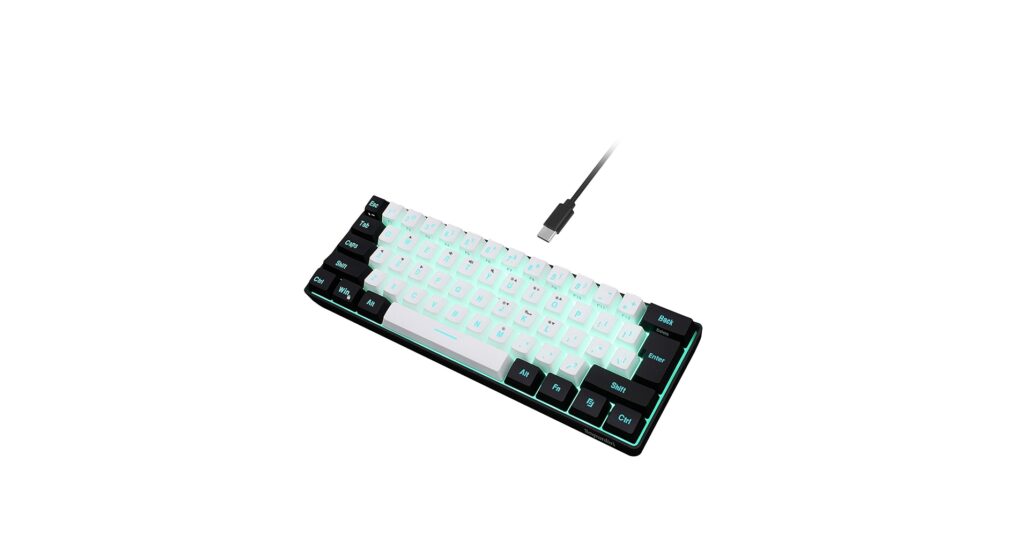
Snpurdiri 60% Wired Gaming Keyboard

For a pure high-tech, minimalist aesthetic, the Snpurdiri 60% model wins with its ultra-compact form factor and vibrant RGB lighting, easily outshining the function-focused, large-print alternatives.
In 2026, the quest for the perfect desk setup is all about clean lines and striking contrasts. A white and black keyboard isn’t just a tool; it’s a statement piece that anchors your workspace aesthetic. Whether you’re a minimalist, a gamer, or someone who values clarity and function, the monochrome palette offers timeless appeal. Our market research dives into the top contenders, from compact gaming keyboards to high-visibility models, to help you find the perfect match for your desk’s personality.
Product Comparison
| Product | Layout/Size | Key Type | Best For |
|---|---|---|---|
| Snpurdiri 60% Gaming Keyboard | 60% Compact | Membrane | Minimalist Gaming & Aesthetics |
| Logickeyboard LargePrint Mac | Full-size w/ Numpad | Membrane (Scissor-switch) | Mac Users & High Visibility |
| Nuklz N Large Print Keyboard | Full-size w/ Numpad | Membrane | Accessibility & General Use |
| Double Shot PBT Keycaps | Keycap Set (Not a keyboard) | N/A (Component) | DIY Keyboard Customization |
| Logickeyboard XL Print PC | Full-size w/ Numpad | Membrane (Scissor-switch) | PC Users & High Visibility |
Detailed Reviews
1. Snpurdiri 60% Wired Gaming Keyboard
Pros
- Ultra-compact 60% layout saves significant desk space
- Customizable RGB backlighting for a personalized look
Cons
- Lacks dedicated arrow and function keys
- Membrane keys, not true mechanical switches
The Breakdown: The Snpurdiri 60% keyboard is designed for the modern, space-conscious user. Its primary appeal is its tiny footprint, which frees up valuable desk real estate for mouse movement or just a cleaner look. The addition of RGB lighting provides a dynamic visual element that fits perfectly into gaming or tech-forward setups.
Key Specs:
- Layout: 60% (61 Keys)
- Key Type: Membrane
- Connectivity: Wired (USB-C)
- Features: RGB Backlighting, Ergonomic design
The Community Verdict: Users consistently praise its aesthetic value and compact size, noting it’s a great entry point into smaller form-factor keyboards. The consensus is that while the typing feel can’t compete with premium mechanical boards, its visual appeal and price point make it a strong contender. Some users note a learning curve due to the lack of dedicated arrow keys.
Dealbreaker: Skip this if you rely heavily on the number pad, function row, or dedicated arrow keys for productivity tasks like spreadsheets or coding.
2. Logickeyboard LargePrint White on Black – Mac

Pros
- Extremely clear, large-print keys for easy reading
- Includes Mac-specific function keys and shortcuts
Cons
- Basic design lacks modern aesthetic appeal
- Bulky, full-size layout takes up considerable desk space
The Breakdown: The Logickeyboard is a purpose-built tool designed for maximum clarity. Its high-contrast white-on-black legends are significantly larger than standard keys, reducing eye strain and improving typing accuracy for those with visual impairments. It’s a full-size board with a familiar Mac layout, making it a seamless transition for Apple users.
Key Specs:
- Layout: Full-size Mac Layout
- Key Type: Scissor-switch Membrane
- Connectivity: Wired (USB)
- Features: Large-print keycaps, 2-port USB hub
The Community Verdict: Market research indicates that this keyboard is highly valued in communities where visibility is a priority, such as senior centers and accessibility forums. Owners report that the keys are exceptionally easy to read in all lighting conditions. The primary critique is its purely functional design, which doesn’t align with the minimalist aesthetic many seek today.
Dealbreaker: Skip this if you are looking for a compact, stylish keyboard for a modern desk setup; this is function over form.
3. Nuklz N Large Print Computer Keyboard
Pros
- Very affordable price point
- Spill-resistant design adds durability
Cons
- Typing experience is reportedly mushy and basic
- Build quality reflects its budget price
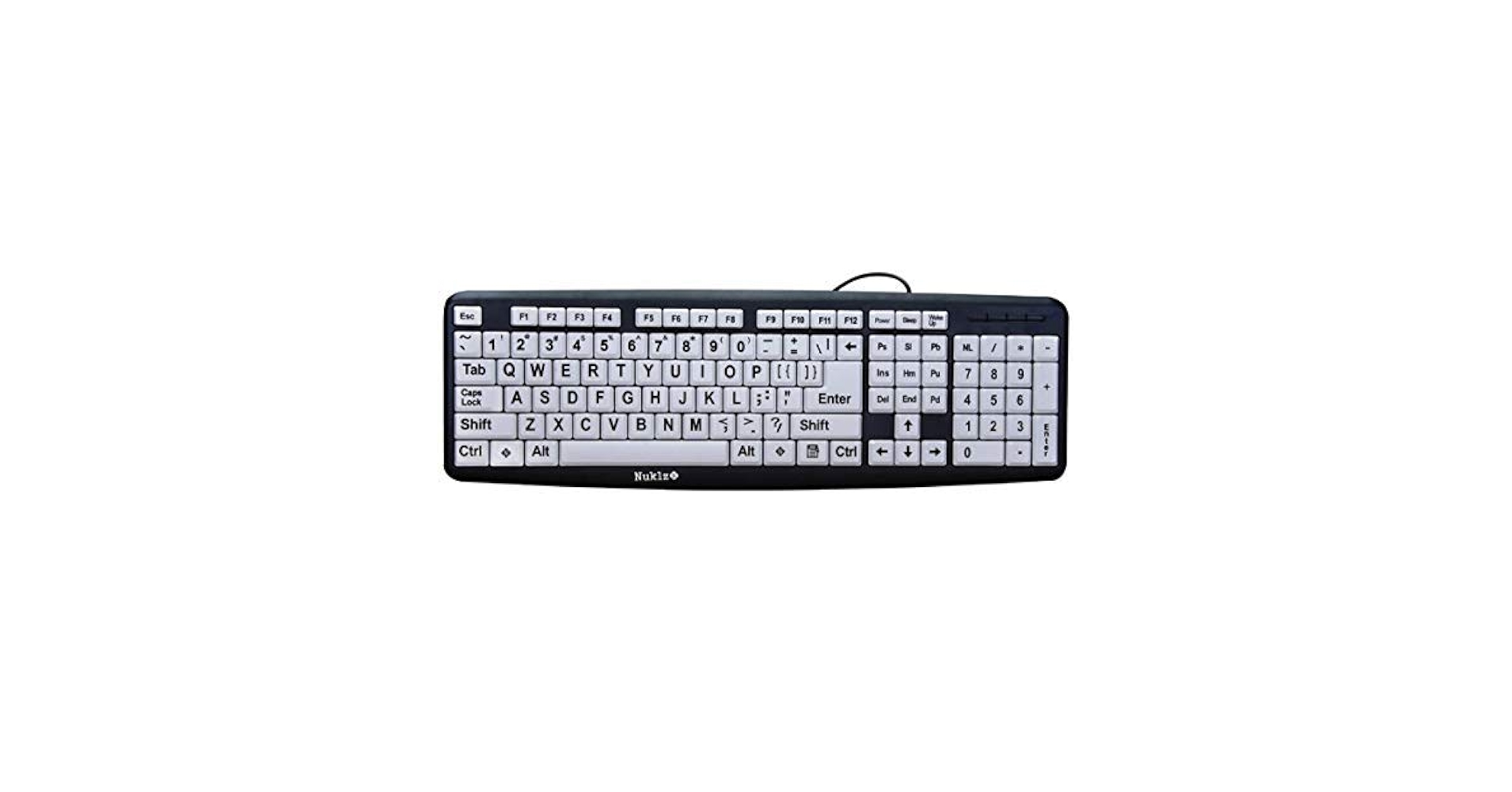
The Breakdown: The Nuklz N keyboard is a no-frills, budget-friendly option for those who need large-print keys. It offers a standard full-size layout and focuses on the core task of providing a highly legible typing experience. Its spill-resistant feature is a practical addition for a workhorse keyboard intended for daily use.
Key Specs:
- Layout: Full-size PC Layout
- Key Type: Membrane
- Connectivity: Wired (USB)
- Features: Large-print keycaps, Spill-resistant
The Community Verdict: Owners often purchase this keyboard for elderly relatives or for environments like workshops where readability is key. The consensus is that it does its job well for the price, but no one should expect a premium feel. Reports often mention the soft, non-tactile key presses as a potential downside for touch typists.
Dealbreaker: Skip this if you type extensively and value a satisfying, tactile feedback; this is a utility-grade product.
4. Double Shot PBT Keycaps (White and Black Set)
Pros
- Durable PBT plastic resists shine and wear
- Double-shot legends will never fade
Cons
- Requires you to own a compatible mechanical keyboard
- Installation can be tedious for beginners
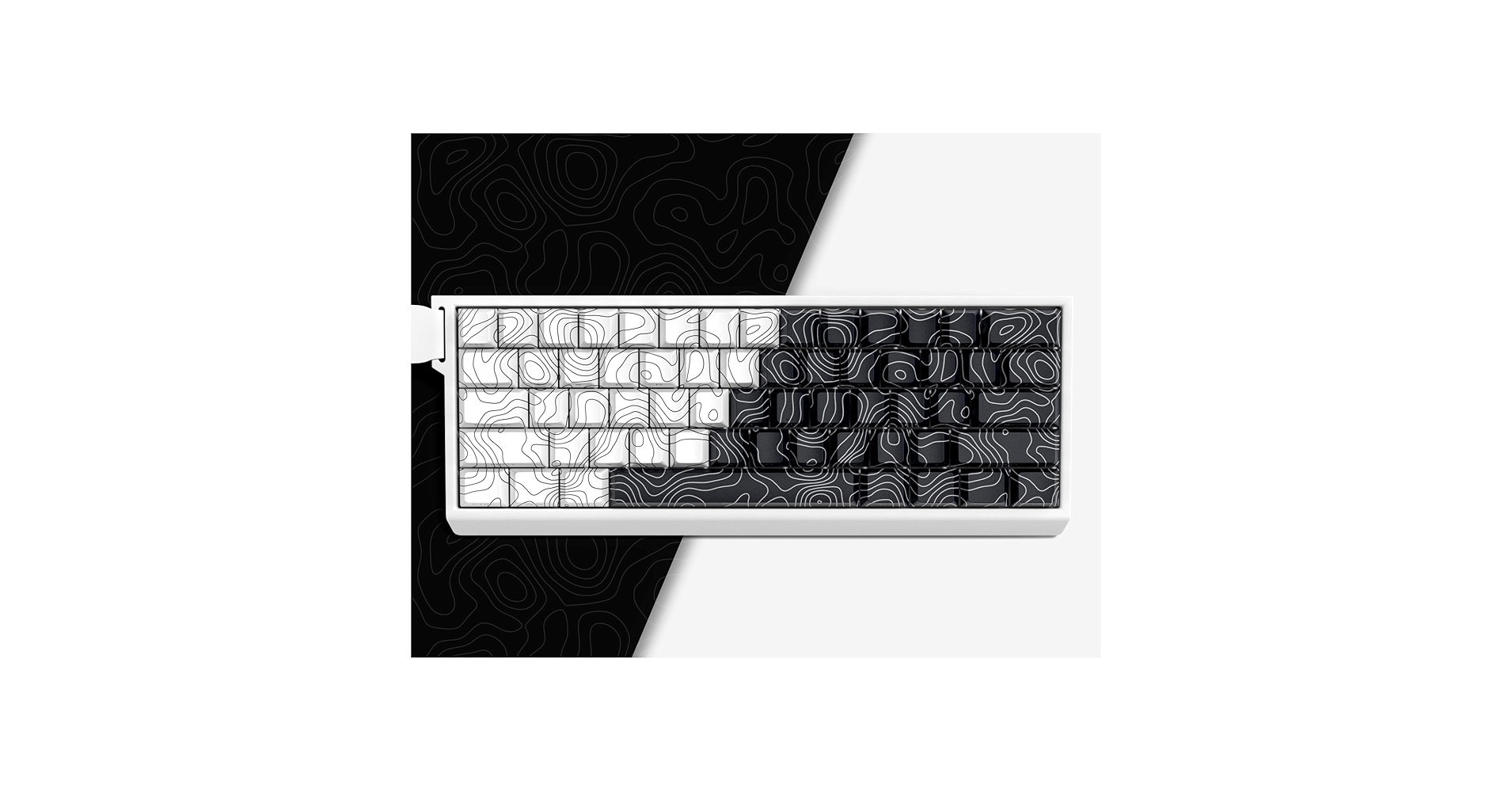
The Breakdown: This is not a keyboard, but an upgrade kit. These double-shot PBT keycaps allow you to transform a compatible mechanical keyboard into a premium-feeling white and black centerpiece. PBT plastic is superior to standard ABS, offering a textured feel that doesn’t get shiny with use, and the double-shot molding process ensures the legends never wear off.
Key Specs:
- Product Type: Keycap Set
- Material: PBT Plastic
- Profile: (e.g., Cherry, OEM – Varies by listing)
- Compatibility: Standard ANSI layout with MX-style switches
The Community Verdict: In the enthusiast community, PBT keycaps are a highly recommended upgrade. Users report a significant improvement in both typing feel and sound compared to stock keycaps. The white-on-black color scheme is a classic choice for a clean, sophisticated custom look.
Dealbreaker: Skip this if you don’t own a mechanical keyboard with a standard layout or are not comfortable with swapping out keycaps yourself.
5. Logickeyboard XL Print PC slim line white on black
Pros
- Slim, low-profile design is more modern than other large-print options
- Scissor-switch keys offer a quiet, stable typing experience
Cons
- Still a full-size board, so not space-saving
- Higher price point for a membrane keyboard
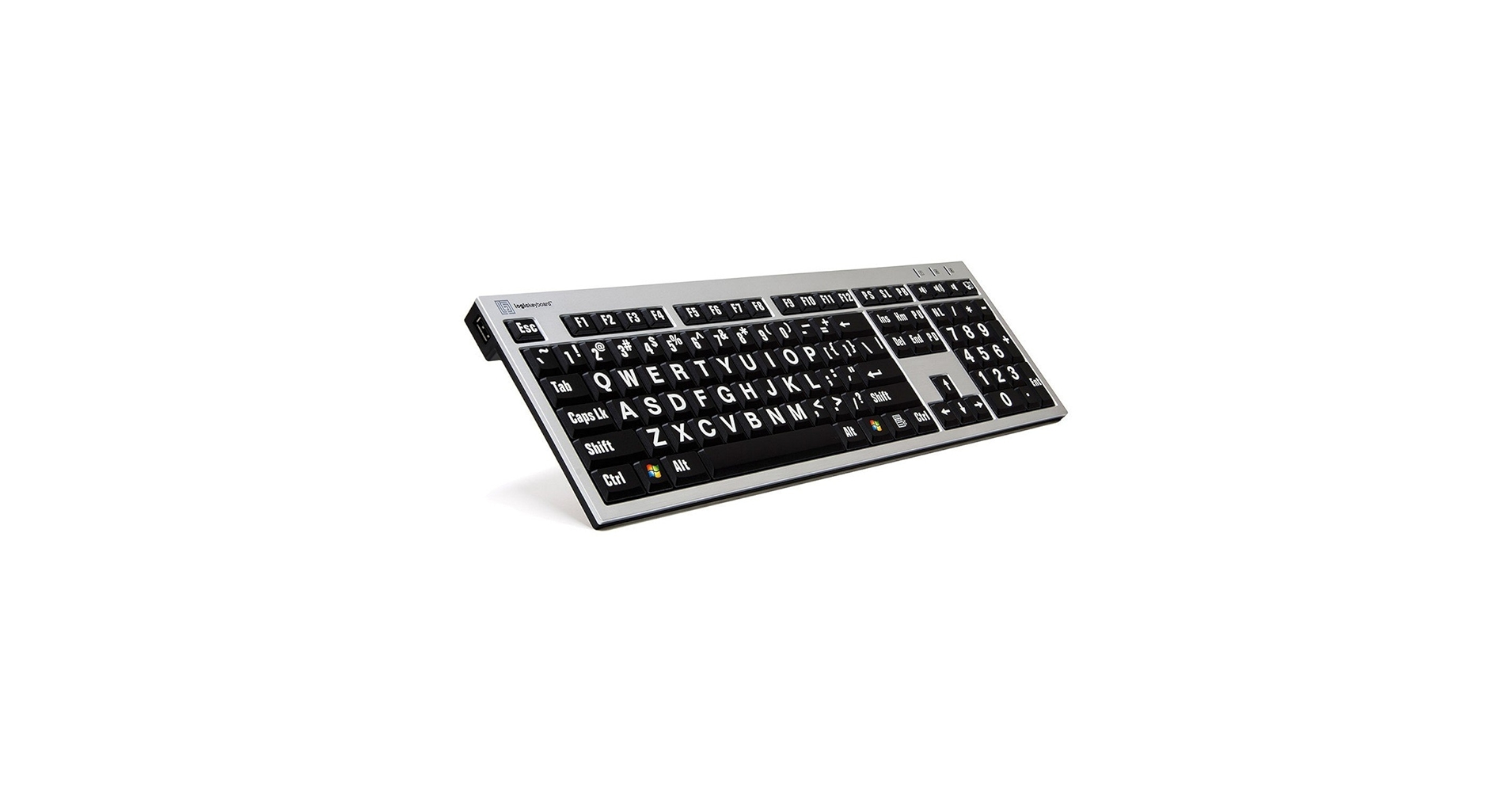
The Breakdown: This Logickeyboard model bridges the gap between pure accessibility and a slightly more refined design. The slim line profile and scissor-switch mechanism mimic the feel of many modern laptop keyboards, offering a short, crisp keypress. It combines this sleeker form with the brand’s signature large-print, high-contrast keys for PC users.
Key Specs:
- Layout: Full-size PC Layout
- Key Type: Scissor-switch Membrane
- Connectivity: Wired (USB)
- Features: Large-print keycaps, Slim profile, 2-port USB hub
The Community Verdict: Users who prefer a laptop-style typing feel but need the enhanced visibility of large print are the target audience, and reports suggest it serves them well. The quiet operation is often highlighted as a major plus for office environments. The main point of contention is its price, which is high for a keyboard that is not mechanical.
Dealbreaker: Skip this if you want the deep travel and tactile feedback of a traditional or mechanical keyboard.
Buying Guide: Choosing Your White and Black Keyboard
Selecting the right monochrome keyboard goes beyond just color. Consider these factors to align the hardware with your needs and desk aesthetic.
1. Layout: Form vs. Function
The first decision is size. A 60% board like the Snpurdiri is fantastic for a minimalist look and maximizing mouse space. However, if your workflow depends on a number pad or frequent use of F-keys, a full-size layout is non-negotiable. For a deeper dive into all the available layouts and what might be right for you, check out The Ultimate Guide To Buying The Perfect Keyboard.
2. Primary Use Case: Aesthetics or Accessibility?
Be honest about your needs. Are you primarily curating a visual theme for your desk? Then the Snpurdiri or a custom board using the PBT keycaps is your best bet. If, however, your main goal is to reduce eye strain and improve readability, the Logickeyboard or Nuklz models are purpose-built for that task. Some advanced users even customize their setups for ergonomics with accessories like a tenting kit for split keyboards to further tailor their workspace.
3. DIY and Customization
For the ultimate aesthetic control, nothing beats a custom build. Starting with a solid base, perhaps a premium model like the Bridge75 Keyboard, and adding a high-quality set of white-and-black PBT keycaps gives you the best of both worlds: a superior typing experience and a look that is entirely your own.
Frequently Asked Questions (FAQ)
Q1: What’s the main difference between a mechanical and a membrane keyboard?
A: Membrane keyboards (like the Snpurdiri and large-print models) use a rubber dome under each key. They are generally quieter and cheaper. Mechanical keyboards use individual physical switches for each key, offering more tactile feedback, durability, and customization options, but at a higher cost.
Q2: Is a 60% keyboard good for everyday work?
A: It can be. If your work is primarily typing text, a 60% keyboard is excellent for ergonomics and aesthetics. However, if you frequently use arrow keys, the function row, or a number pad (e.g., for data entry), you might find the reliance on function-layer shortcuts to be inefficient.
Q3: Are large-print keyboards only for people with vision problems?
A: While that is their primary market, they can also be useful for children learning to type, in low-light environments, or for anyone who simply prefers larger, clearer text to reduce cognitive load and find keys more quickly.
Q4: Can I put custom keycaps on any keyboard?
A: No. Custom keycap sets are designed for mechanical keyboards with a specific switch type (most commonly Cherry MX-style stems) and a standard layout (like ANSI or ISO). They will not fit on most membrane or laptop-style scissor-switch keyboards.
Read More on TechForDesk
- The 5 Best Adjustable Height Desk Shelf for iMac in 2026
- The 5 Best Monitor Riser with Laptop Tray Options for Peak Productivity in 2026
- The 5 Best Desk Shelf with Keyboard Storage Underneath Options (2026)
- The 5 Best Monitor Stand with USB C Hubs in 2026
- The 5 Best Desk Shelf with Built-in Wireless Charging for 2026




