

The modern desk is an ecosystem of efficiency, and the humble keyboard is evolving. Adding an integrated screen transforms it from a simple input device into a dynamic command center. A keyboard with LED display can show you vital system stats, custom animations, or even just the time, all without cluttering your main monitor. In our 2026 market analysis, we’ve dissected the top options—from high-performance mechanical keyboards to unique novelty items—to help you find the perfect fit for your setup.
🚀 Quick Verdict / Top Pick
AULA S99 Pro Wireless Keyboard

The AULA S99 Pro stands out as the only true enthusiast-grade mechanical keyboard on this list, offering a highly functional color display, premium gasket-mount typing feel, and versatile tri-mode connectivity that the others can’t match.
Comparison Chart
| Product | Display Functionality | Switch Type | Best For |
|---|---|---|---|
| AULA S99 Pro | Custom GIFs, System Stats, Time | Mechanical (Gasket-Mount) | Productivity & Gaming Enthusiasts |
| ZIYOU LANG M96 | Basic Status Indicators | Silent Membrane | Budget-Conscious Users |
Detailed Product Reviews 2026
1. AULA S99 Pro Wireless Keyboard
Pros
- Customizable TFT color screen for GIFs/stats
- Tri-mode connectivity (2.4G, BT, Wired)
- Gasket-mounted structure for a soft typing feel
- South-facing RGB and hot-swappable switches
Cons
- Companion software can have a learning curve
- Higher price point than membrane options
The Breakdown: The AULA S99 Pro is the quintessential modern keyboard with an LED display. It combines the tactile satisfaction of a mechanical keyboard with the utility of a small screen that can be customized via software. Its compact 99-key layout saves desk space without sacrificing a numpad, making it a versatile choice for both work and play.
Key Specs:
- Layout: 98-Key / 96% Compact
- Connectivity: 2.4GHz, Bluetooth 5.0, USB-C
- Switch Type: Mechanical (Hot-swappable)
- Display: 1.14-inch TFT Color Screen
- Battery: 4000mAh
The Community Verdict: Market research indicates users are highly impressed with the out-of-the-box sound and feel, often comparing it to more expensive custom builds. The display is a celebrated feature for its novelty and practical use in monitoring PC performance. Some users note that the customization software isn’t the most intuitive at first but is powerful once learned.
Dealbreaker: Skip this if you need a full-size, 104-key layout or prefer a simple, plug-and-play device without any software customization.
2. ZIYOU LANG M96 Wireless Gaming Silent Membrane
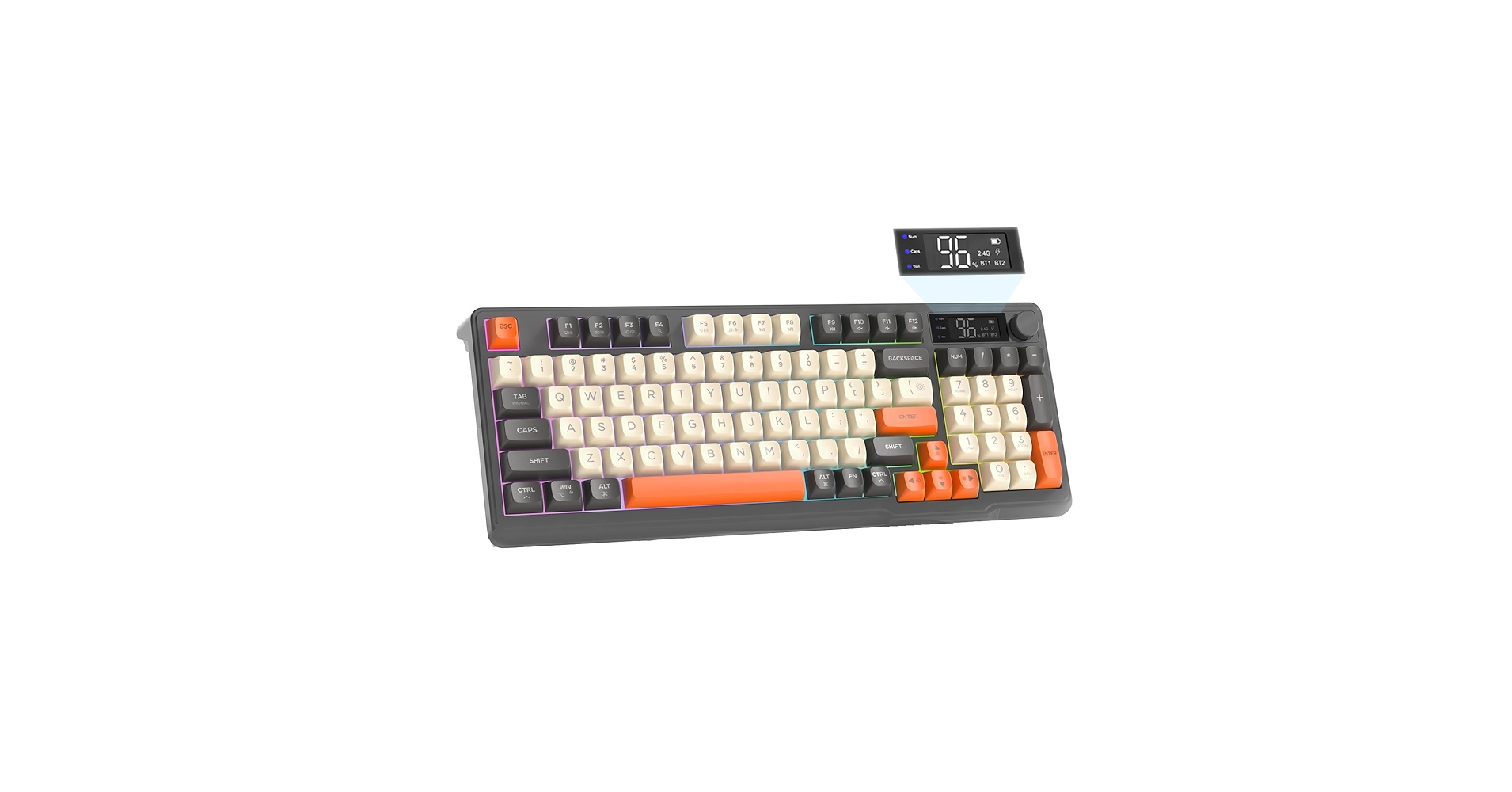
Pros
- Affordable price point
- Silent membrane switches are ideal for shared spaces
- Multi-device Bluetooth connectivity
Cons
- Display is limited to basic status lights (battery/connection)
- Membrane feel lacks tactile feedback of mechanical switches
The Breakdown: The ZIYOU LANG M96 offers the aesthetic of a modern gaming keyboard without the high cost or loud clicks of mechanical switches. Its ‘display’ is more of a smart indicator panel, showing connection status and battery life clearly. This makes it a practical, no-fuss option for those who prioritize silence and affordability.
Key Specs:
- Layout: 96-Key Compact
- Connectivity: Bluetooth, USB-C
- Switch Type: Silent Membrane
- Display: LED Status Indicators
- Features: Multi-device switching, RGB backlighting
The Community Verdict: Users consistently report that its quiet operation is a major plus for office environments and late-night use. The battery life is considered solid, and the multi-device pairing works seamlessly. The consensus is that while it doesn’t offer a premium typing feel, it delivers excellent value for its price.
Dealbreaker: Skip this if you’re seeking a tactile, clicky typing experience or want a fully customizable, high-resolution screen for more than just status icons.
Buying Guide: Choosing the Right Keyboard with an LED Display
The term “keyboard with led display” can lead you to very different products. Here’s how to narrow down your choice.
1. Define the Display’s Purpose
First, decide what you want the screen to do. Are you looking for a high-tech command center that shows CPU temperature, time, and custom animations, like on the AULA S99 Pro? Or do you just need simple status indicators for battery and connection, as seen on the ZIYOU LANG M96? Or perhaps you’re not looking for a computer peripheral at all, but a novelty clock or a child’s musical instrument. Clarifying this primary need is the most important step.
2. Consider Ergonomics and Typing Feel
Beyond the display, the typing experience is paramount. For those who spend hours at their desk, preventing strain is crucial, which is where an orthopedic keyboard for wrist pain might be a better long-term solution. While the models here aren’t strictly ergonomic, the AULA’s gasket-mount design is noted for a softer, more cushioned feel that can reduce finger fatigue compared to standard membrane keyboards.
3. Key Visibility and Accessibility
A bright LED display can be a great visual aid, but the keys themselves are just as important for usability. Most keyboards with screens also feature RGB backlighting, which helps with visibility in low-light conditions. For users who need maximum clarity, exploring a dedicated keyboard for the visually impaired with high-contrast, large-print keys is a worthwhile consideration to pair with your setup.
Frequently Asked Questions (FAQ)
Are keyboards with screens worth it?
For enthusiasts and power users, they absolutely can be. A screen can offload non-critical information from your main monitor, providing at-a-glance data like system performance, time, or notifications. For most casual users, however, it’s more of a luxury or aesthetic feature than a necessity.
What can you display on a keyboard LED screen?
This varies greatly by model. Basic versions show connection mode, battery level, or Caps Lock status. Advanced screens, like on the AULA S99 Pro, are fully customizable via software and can display hardware stats (CPU/GPU temp), custom images, animated GIFs, the date and time, and more.
Do keyboard screens drain the battery faster?
Yes, any additional feature that requires power, especially a color screen, will impact battery life on a wireless keyboard. The effect is usually minimal in the grand scheme of daily use, but you may need to charge a keyboard with a screen slightly more often than a model without one. Most can be used in wired mode while charging, eliminating this as a major issue.




