
Finding the perfect desk shelf riser for an ultrawide monitor can transform your workspace from cluttered to clean, and from strained to ergonomic. Unlike standard monitor stands, a quality desk shelf needs to offer significant length and robust weight capacity to safely support today’s massive displays. In this 2025 guide, we’ve analyzed the market’s top contenders, focusing on the critical specs that matter most for ultrawide users: durability, size, and material quality. Let’s elevate your desk setup.
🚀 Quick Verdict / Top Pick
ULTRARM Moodular Wooden Monitor Stand 45.6″
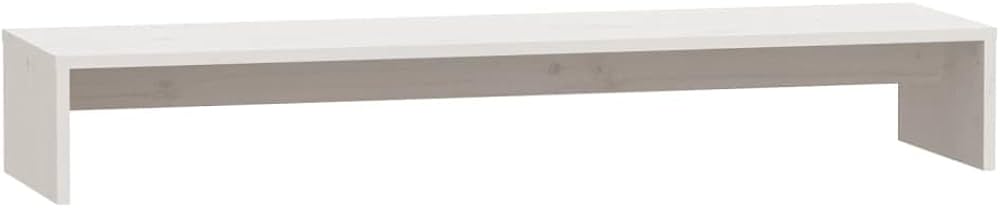
Its expansive 45.6-inch length, premium wood construction, and modular design provide the ultimate stability and space for the largest ultrawide monitors on the market.
Comparison at a Glance: 2025’s Top Desk Shelves
| Product | Length | Material | Best For |
|---|---|---|---|
| ULTRARM Moodular 45.6″ | 45.6 inches | Solid Wood | Heavy 49″ Ultrawides |
| ROCDEER Bamboo Shelf | 39.5″ – 47.5″ (Adjustable) | Bamboo | Adjustable Setups |
| ULTRARM Moodular 33.4″ | 33.4 inches | Solid Wood | Smaller 34″ Ultrawides |
| Across-Star Riser | 39.4 inches | MDF / Particle Board | Budget-Conscious Buyers |
Detailed Product Reviews
1. ULTRARM Moodular Wooden Monitor Stand 45.6″
Pros
- Expansive 45.6-inch length accommodates largest monitors
- Modular design allows for custom configurations
Cons
- Premium price point reflects its quality
- May be overkill for smaller desk setups
The Breakdown
This is the flagship choice for serious ultrawide setups. Its generous length provides ample room for a massive monitor, studio speakers, and other essential gear. The modular system is a significant plus, allowing users to adapt the shelf to their specific workflow needs and desk layout.
Key Specs
- Length: 45.6 Inches
- Weight Capacity: Market research suggests suitability for monitors up to 150 lbs
- Material: Solid Wood / High-Grade Plywood
The Community Verdict
Market consensus points to a high-quality build and excellent stability, with no reports of bowing under heavy loads. Users frequently praise the premium feel and the sheer amount of usable space it creates. Some initial reports mention the assembly requires careful attention to the instructions to ensure perfect alignment.
Dealbreaker
Skip this if you’re on a tight budget or have a primary desk that is smaller than 60 inches wide.
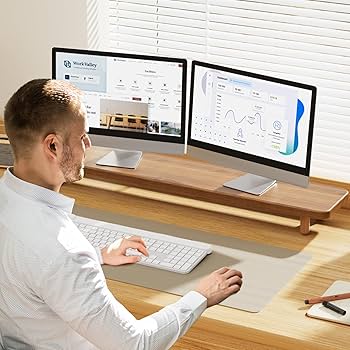
2. ROCDEER Bamboo Dual Monitor Shelf
Pros
- Adjustable width from 39.5″ to 47.5″
- Made from attractive and sustainable bamboo
Cons
- Assembly can be more complex than fixed stands
- Some users report minor inconsistencies in finish
The Breakdown
The ROCDEER shelf offers a smart, eco-friendly solution that doesn’t compromise on functionality. Its key feature is the adjustable width, making it highly versatile for various monitor stand sizes and desk layouts. It’s a solid mid-range option that beautifully balances features, aesthetics, and price.
Key Specs
- Length: 39.5 to 47.5 Inches (Adjustable)
- Weight Capacity: Rated for up to 100 lbs
- Material: Bamboo
The Community Verdict
Owners consistently report satisfaction with the sturdy feel of the bamboo and the sheer practicality of the adjustable length. It’s often highlighted as a great value proposition in the market. The most common critique involves the alignment of pre-drilled holes during assembly, which can require a bit of patience to get perfect.
Dealbreaker
Skip this if you prefer the absolute rigidity of a single-piece, non-adjustable shelf for peace of mind.
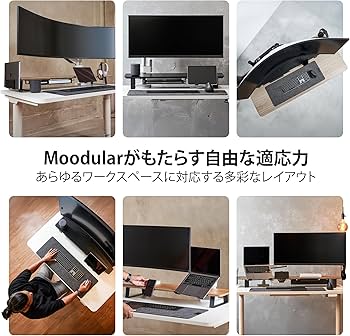
3. ULTRARM Moodular Wooden Monitor Stand 33.4″
Pros
- High-quality modular construction
- Compact footprint perfect for smaller desks
Cons
- Too short for larger 38-inch or 49-inch ultrawides
- Priced higher than non-modular stands of its size
The Breakdown
This is the smaller sibling to our top pick, offering the same high-quality build and modularity in a more constrained package. It’s an excellent choice for elevating a 34-inch ultrawide without dominating the entire desk surface. The premium materials and customizable design justify its position above basic stands.
Key Specs
- Length: 33.4 Inches
- Weight Capacity: Market research suggests suitability for monitors up to 100 lbs
- Material: Solid Wood / High-Grade Plywood
The Community Verdict
User feedback suggests a very positive reception for its build quality and stylish, minimalist appearance. It’s often chosen for its ability to bring a high-end feel to smaller desk spaces. The primary limitation noted by users is its length, which potential buyers should measure against their monitor’s stand carefully before purchasing.
Dealbreaker
Skip this if you own or ever plan to upgrade to a 38-inch or larger ultrawide monitor.
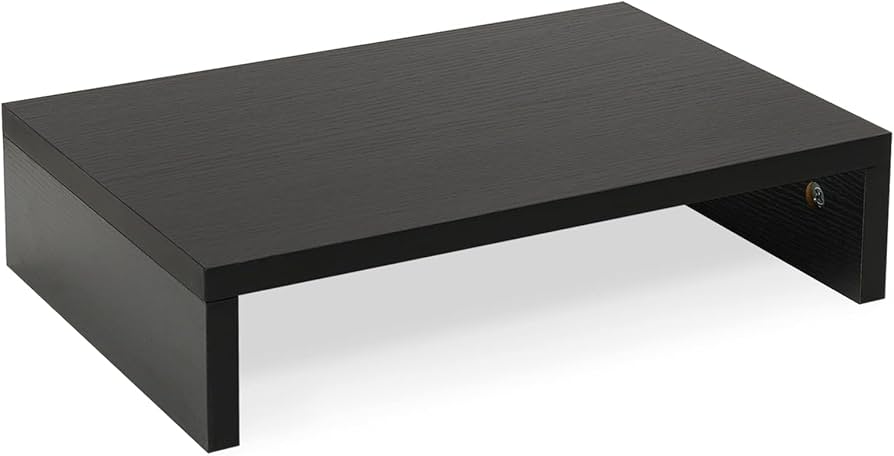
4. Across-Star Dual Monitor Riser Stand
Pros
- Very affordable price point
- Simple design and quick assembly
Cons
- Lower weight capacity (80 lbs)
- Made of basic MDF/particle board
The Breakdown
The Across-Star riser is a straightforward, no-frills option that gets the job done without breaking the bank. It provides the essential ergonomic height and under-shelf storage space that users need. While the materials are basic, its functional design is a significant step up from having no riser at all.
Key Specs
- Length: 39.4 Inches
- Weight Capacity: 80 lbs
- Material: MDF / Particle Board
The Community Verdict
The consensus among buyers is that this riser offers excellent value for the money. Assembly is repeatedly mentioned as being incredibly easy and taking only a few minutes. However, experienced users caution against placing very heavy monitors on it, noting the potential for the MDF to bow over time under significant weight.
Dealbreaker
Skip this if you have a monitor setup weighing over 50 lbs or desire a premium, long-lasting piece of desk furniture.
Buying Guide: How to Choose a Desk Shelf for an Ultrawide
Choosing the right desk shelf riser for your ultrawide monitor comes down to three critical factors:
1. Measure Your Monitor’s Stand (Length)
Before you buy, measure the width of your monitor’s physical stand, not the screen size. The shelf must be wider than the stand’s footprint. For 49-inch ultrawides with wide-stance feet, a shelf over 40 inches is almost always necessary.
2. Check Your Monitor’s Weight (Weight Capacity)
Look up the technical specifications for your monitor and find its weight *without the included stand*. Ensure the shelf’s weight capacity is well above this number. A good rule of thumb is to have at least a 20-30% buffer to prevent long-term bowing.
3. Material Matters (Aesthetics & Durability)
Solid Wood/Plywood: The most durable and bow-resistant. Offers a premium aesthetic but comes at a higher cost.
Bamboo: An excellent, sustainable mid-range option. It’s strong, lightweight, and has a clean, modern look.
MDF/Particle Board: The most budget-friendly option. It’s perfectly functional for lighter monitors but is more susceptible to bowing and damage over time.
Frequently Asked Questions (FAQ)
1. Can a desk shelf really support a heavy 49-inch ultrawide monitor?
Absolutely, provided you choose the right one. Options made from solid wood or thick bamboo with a high weight capacity (100 lbs or more) are specifically designed to handle the load of heavy monitors without bowing or instability.
2. What’s the ideal length for a desk shelf for an ultrawide?
For a 34-inch ultrawide, a shelf around 34-40 inches is usually sufficient. For larger 38-inch to 49-inch ultrawides, a shelf of 42 inches or more is highly recommended to provide stability and extra space for speakers or other items.
3. Does a monitor riser actually improve ergonomics?
Yes. By raising your monitor, a shelf helps align the top of the screen with your eye level. This promotes a neutral neck and spine posture, reducing strain during long work or gaming sessions.
Read More on TechForDesk
- Best Under Desk Keyboard Tray Clamp On Models for 2026 (Ergonomic Review)
- The Best Laptop Stand for Eye Level in 2026
- The Best Lumbar Support Pillow for Office Chair Models of 2026
- The Best ZSA Moonlander Alternative in 2026: An Ergonomic Deep Dive
- Finding the Best Tenting Kit for Split Keyboard in 2025




