
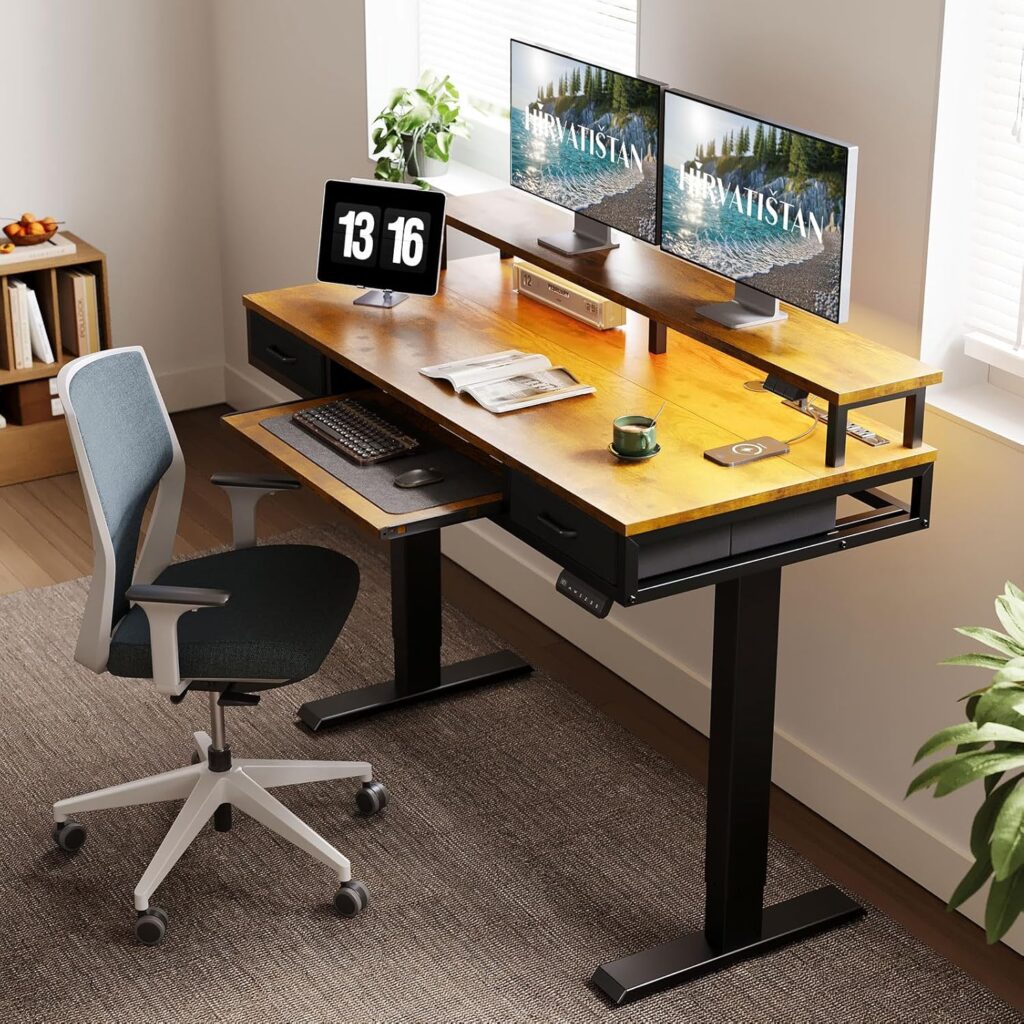
Finding the right keyboard tray for a gaming desk is about more than just clearing up surface space—it’s a critical ergonomic upgrade. The right setup can reduce wrist strain and improve your posture, letting you focus on the win during long sessions. In 2025, the market offers two clear paths: upgrading your current battle station with a versatile add-on tray, or investing in a new desk with an integrated solution. We’ve analyzed the top options to help you find the perfect fit for your rig, whether you’re a casual player or a pro streamer.
🚀 Quick Verdict / Top Pick
EUREKA ERGONOMIC Height Adjustable Keyboard Tray

It’s our top pick for being a true, purpose-built add-on that offers superior size and ergonomic adjustability, making it the best way to upgrade an existing gaming desk.
2025 Keyboard Tray Solutions: At a Glance
| Product | Integration Type | Tray Dimensions (WxD) | Best For |
|---|---|---|---|
| EUREKA ERGONOMIC Tray | Add-on (Clamp) | 27.6″ x 12.2″ | Upgrading Existing Desks |
| Auromie 72″ Gaming Desk | Integrated (Full Desk) | 23.6″ x 11.8″ | All-in-One Battlestations |
| AODK Electric Standing Desk | Integrated (Full Desk) | 25.6″ x 11.8″ | Ergonomic Sit/Stand Setups |
| AODK Computer Desk | Integrated (Full Desk) | 23.2″ x 11.8″ | Budget-Conscious Builds |
Detailed Product Reviews
Auromie 72″ Gaming Desk with Power Outlets & LED

Pros
- Enormous 72-inch surface area
- Built-in power outlets and RGB lighting
Cons
- Keyboard tray is not adjustable
- Requires replacing your entire desk
The Breakdown
This is less a desk and more a complete command center. Its massive surface is ideal for multi-monitor setups, and integrated features like power strips and RGB LEDs streamline your entire rig. The built-in keyboard tray is a functional addition that keeps the main desktop clear, though it lacks any ergonomic adjustment.
Key Specs
- Desk Dimensions: 72″W x 24″D x 36″H
- Tray Dimensions: 23.6″W x 11.8″D
- Material: Particle Board, Metal Frame
- Features: Power Outlets, USB Charging, RGB LED Strip, Monitor Stand
The Community Verdict
Consensus is that the Auromie desk offers incredible value for its sheer size and integrated features. Users consistently praise the vast amount of space and the convenience of built-in power. However, some experienced builders note the fixed position of the keyboard tray as a minor drawback for pure ergonomic tuning.
Dealbreaker?
Skip this if you need an adjustable, ergonomic keyboard tray or if you don’t have the space to accommodate a 72-inch desk.
EUREKA ERGONOMIC Height Adjustable Keyboard Tray

Pros
- Large surface fits full-size keyboard and mouse
- Height adjustable for tailored ergonomics
Cons
- Clamp may not fit all desk types (e.g., beveled edges)
- Assembly is required
The Breakdown
The EUREKA ERGONOMIC tray is the quintessential upgrade for an existing setup. Its robust clamp system provides a stable platform, and its generous dimensions mean you won’t compromise on mouse space. The key feature is its height adjustability, allowing you to dial in the perfect position for ergonomic comfort during intense gaming marathons.
Key Specs
- Tray Dimensions: 27.6″W x 12.2″D
- Material: Carbon Fiber Texture Surface, Steel Frame
- Adjustment: 5 Height Settings
- Compatibility: Fits desks from 0.4″ to 1.96″ thick
The Community Verdict
Users consistently report that this tray is exceptionally sturdy and wobble-free, a critical factor for gaming. The large surface area is a frequent point of praise. The main caution from the community is to double-check your desk’s underside for support beams or lips that could interfere with the clamp placement.
Dealbreaker?
Skip this if your desk has a thick frame, a beveled edge, or a support bar directly under the edge that would block the C-clamps.
AODK Electric Standing Desk with Drawers

Pros
- Smooth electric sit/stand functionality
- Includes drawers and keyboard tray
Cons
- Keyboard tray position is fixed
- More expensive than static desks
The Breakdown
This AODK desk brings the ergonomic benefits of a standing desk into the gaming space. The electric lift is smooth, and memory presets make switching between sitting and standing effortless. The inclusion of a keyboard tray and fabric drawers provides a clean, organized setup, though the tray itself is basic and non-adjustable.
Key Specs
- Desk Dimensions: 55″W x 24″D
- Tray Dimensions: 25.6″W x 11.8″D
- Height Range: 28.3″ to 46.5″
- Features: 4 Memory Presets, 2 Fabric Drawers, Headphone Hooks
The Community Verdict
Market research indicates that users are highly satisfied with the desk’s core standing functionality and quiet motor. The overall stability, even at full height, is considered good for most gaming. The primary critique is the lack of independent adjustability for the included keyboard tray.
Dealbreaker?
Skip this if you don’t need or want a standing desk, or if your ergonomic needs demand a keyboard tray with tilt and height adjustment.
AODK Computer Desk with Drawers, 55″

Pros
- Extremely budget-friendly price point
- Includes drawers and monitor shelf
Cons
- Basic particle board construction
- Tray is small and non-adjustable
The Breakdown
This desk is an entry-level, all-in-one solution for those who need a functional workspace without a heavy investment. It packages a decent-sized desktop, storage drawers, a monitor shelf, and a keyboard tray into a highly affordable unit. While not built for high-end gaming rigs, it covers all the basic needs for a compact setup.
Key Specs
- Desk Dimensions: 55″W x 19.7″D x 35.4″H
- Tray Dimensions: 23.2″W x 11.8″D
- Material: Particle Board, Metal Frame
- Features: 2 Drawers, Monitor Riser, Headphone Hooks
The Community Verdict
The consensus is that you get what you pay for in the best way possible; it’s a solid value. Owners report it’s functional for its intended use as a home office or light gaming desk. The most common criticisms revolve around a time-consuming assembly process and the basic quality of the materials.
Dealbreaker?
Skip this if you need a heavy-duty desk for multiple monitors or demand premium materials and perfect stability for competitive gaming.
Buying Guide: How to Choose the Right Keyboard Tray Solution
Choosing the perfect keyboard tray for your gaming desk comes down to your current setup and future needs.
1. Add-On Tray vs. Integrated Desk
If you already have a gaming desk you love, an add-on tray like the EUREKA ERGONOMIC is the logical choice. It’s cost-effective and provides superior adjustability. If you’re building a setup from scratch or need a total overhaul, an integrated desk can offer a seamless, feature-rich experience, but often at the cost of tray adjustability.
2. Size and Stability
Measure your peripherals. A full-size mechanical keyboard and a gaming mouse require significant real estate. Look for trays wider than 27 inches for optimal comfort. For gaming, stability is non-negotiable; a wobbly tray is a dealbreaker. Prioritize options with solid steel clamps and frames that user reviews confirm are stable.
3. Ergonomic Adjustments
The whole point of an under-desk tray is to achieve a negative tilt (where the top of the keyboard is lower than the bottom) and position your keyboard at elbow height. This neutral wrist posture reduces strain. While integrated trays are convenient, dedicated add-on trays almost always offer better height and sometimes tilt adjustments, making them the superior choice for pure ergonomics.
Frequently Asked Questions
Are keyboard trays good for gaming?
Yes, when implemented correctly. A stable, correctly positioned keyboard tray promotes better posture by keeping your arms at a natural angle, frees up desk space for large mousepads, and can reduce wrist fatigue during long gaming sessions. The key is to choose a tray that is large enough and does not wobble.
How much space do I need under my desk for a clamp-on tray?
It varies by model, but you generally need at least 2 inches of clear, flat space from the desk edge inward for the clamps to attach securely. Always check the product specifications and measure your desk’s underside, watching out for support bars, frames, or drawers that could interfere.
Can I fit a full-size keyboard and a mouse on a keyboard tray?
Yes, but tray size is critical. A standard full-size keyboard is about 17-18 inches wide. For comfortable mouse movement, you’ll want at least 8-10 inches of extra space. Look for trays with a width of 27 inches or more, like the EUREKA ERGONOMIC model, to comfortably accommodate both.




