
Finding the right ergonomic gear can be a challenge, but it’s even harder when you’re left-handed with smaller hands. Standard mice are simply not built for you. That’s why we’ve focused our market research on the best left handed vertical mouse for small hands available in 2025. These devices are designed to reduce wrist strain by promoting a natural ‘handshake’ posture, and their compact form factor ensures all buttons are comfortably within reach. Say goodbye to discomfort and hello to a more productive, pain-free workflow.
🚀 Quick Verdict / Top Pick
SANWA Wired Left Handed Ergonomic Mouse
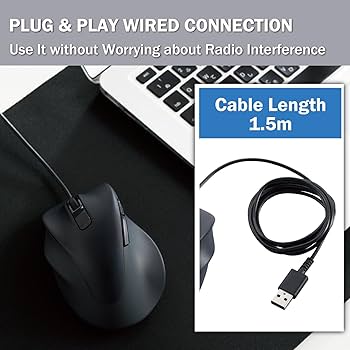
It wins because it’s one of the few models specifically engineered and marketed for a compact fit, making it the most direct and reliable solution for users with genuinely small hands.
Comparison Guide 2025
| Product | Connectivity | Designed Hand Size | Best For |
|---|---|---|---|
| SANWA Wired Small | Wired (USB-A) | Small | True Small-Handed Users |
| J-Tech Digital Wireless | Wireless (2.4GHz) | Small-to-Medium | Wireless Freedom |
| DeLUX Ergonomic Wireless | Wireless (2.4GHz) | Small-to-Medium | Higher DPI Needs |
| SANWA Wired Standard | Wired (USB-A) | Medium | Budget Medium-Hand Option |
Detailed Reviews
1. SANWA Wired Left Handed Ergonomic Mouse (Small)
Pros
- Specifically designed for small hands
- Lightweight and easy to maneuver
- Simple plug-and-play operation
Cons
- Wired connection limits mobility
- Fairly basic feature set
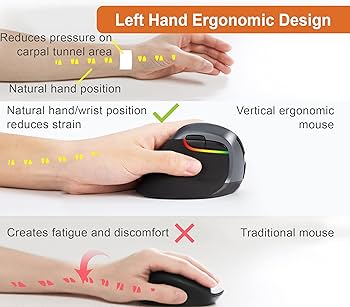
The Lowdown: Market research indicates this SANWA model is a top contender for its focused design. It doesn’t try to be a one-size-fits-all solution; its compact dimensions are its main selling point. The 60-degree vertical angle provides a natural handshake grip that reduces forearm twisting.
Key Specs:
- Connectivity: Wired (USB Type-A)
- Dimensions: 4.09 x 2.48 x 2.2 inches
- Weight: Approx. 3.84 ounces
- Adjustable DPI: 800 / 1200 / 1600
Sentiment Analysis: Users consistently praise its size, with many stating it’s the first mouse that has ever felt comfortable for their small, left hand. The primary criticism revolves around the wired design, which feels dated to some. The build quality is considered solid for the price point.
Dealbreaker: Skip this if you absolutely require a wireless desk setup or need more than the standard forward/back buttons.
2. J-Tech Digital Left Handed Wireless Ergonomic Mouse
Pros
- Wireless freedom (2.4GHz)
- Removable palm rest for a custom feel
- Rechargeable via USB-C
Cons
- Can feel slightly large for very petite hands
- Requires periodic charging
The Lowdown: This J-Tech mouse is the go-to for those who want to cut the cord. Its main advantage is the 2.4GHz wireless connectivity, offering a clean, minimalist desk setup. The inclusion of a detachable palm rest is a clever feature, allowing for some level of customization in grip and feel.
Key Specs:
- Connectivity: Wireless (2.4GHz USB Dongle)
- Dimensions: 4.4 x 2.95 x 2.48 inches
- Weight: Approx. 3.95 ounces
- Adjustable DPI: 800 / 1200 / 1600
Sentiment Analysis: The consensus is that this mouse offers excellent value for a wireless left-handed model. Users appreciate the reliable connection and long battery life between charges. Some feedback suggests that while it’s smaller than standard vertical mice, it fits a ‘small-to-medium’ hand best, and might be a stretch for those with very small palms.
Dealbreaker: Skip this if your hands are on the extremely small side, as the SANWA wired model offers a more guaranteed compact fit.
3. DeLUX Left Handed Ergonomic Vertical Mouse

Pros
- Higher DPI range (up to 2400)
- Unique, highly vertical ‘snail’ shape
- Wireless and rechargeable
Cons
- Unconventional shape has an adjustment period
- Can feel bulky for very petite hands
The Lowdown: DeLUX takes the vertical mouse concept a step further with its ‘snail’ design, which offers a near 90-degree grip. This model stands out with a higher maximum DPI, making it suitable for tasks requiring faster cursor movement, like navigating large monitors. It’s a wireless, rechargeable option for the user looking for something a bit different.
Key Specs:
- Connectivity: Wireless (2.4GHz USB Dongle)
- Dimensions: 4.92 x 3.19 x 2.56 inches
- Weight: Approx. 5.29 ounces
- Adjustable DPI: 800 / 1200 / 1600 / 2400
Sentiment Analysis: Owner reports are often polarized on the shape—it’s a ‘love it or hate it’ design. Those who love it praise it as the ultimate in ergonomic comfort. Others find it takes too long to adjust to. General agreement exists on its solid performance and the utility of the higher DPI settings.
Dealbreaker: Skip this if you prefer a more traditional vertical mouse shape or if you have very small hands, as its overall volume is larger than the other options.
4. SANWA Wired Ergonomic Mouse (Standard Size)
Pros
- Highly affordable price point
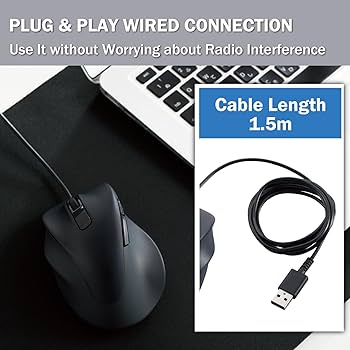
- Reliable and simple wired connection
- Durable build reported by long-term users
Cons
- Not suitable for small hands
- Limited DPI settings
The Lowdown: This SANWA model is included as an important point of comparison. It’s a fantastic, budget-friendly ergonomic mouse for left-handers, but it is built for medium-to-large hands. If you’ve arrived here but realized the ‘small hands’ models might be too cramped, this is your workhorse.
Key Specs:
- Connectivity: Wired (USB Type-A)
- Dimensions: 4.88 x 3.11 x 2.95 inches
- Weight: Approx. 5.6 ounces
- Adjustable DPI: 1000 / 1600
Sentiment Analysis: Reviews for this product are overwhelmingly positive from its target audience: lefties with average hands. It’s celebrated for its durability and straightforward, no-frills performance. The most common negative point is from buyers with small hands who purchased it by mistake and found it cumbersome.
Dealbreaker: Skip this if the phrase ‘for small hands’ in your search was intentional. This mouse is not compact.
Buying Guide: Choosing Your Mouse
When selecting a left handed vertical mouse for small hands, focus on these three factors:
1. Size and Dimensions
This is the most critical factor. Look at the product dimensions (length, width, height) and compare them to your current mouse or your hand size. A mouse is generally considered ‘small’ if its length is under 4.5 inches (11.5 cm). Our top pick, the SANWA Small, is just over 4 inches long, making it a true compact option.
2. Wired vs. Wireless
Wired mice offer a reliable, lag-free connection with no need to worry about batteries. They are typically lighter and more affordable. Wireless mice provide a clean, clutter-free desk and freedom of movement, but they require charging and rely on a USB dongle.
3. DPI (Dots Per Inch)
DPI measures how sensitive the mouse is to movement. A higher DPI means the cursor moves further on the screen for a small physical movement. All models here offer adjustable DPI, allowing you to find a sensitivity level that’s comfortable for your workflow. For general office work, 800-1600 is plenty; higher DPI is useful for large, high-resolution monitors.
Frequently Asked Questions
How do I know if I have ‘small hands’ for a mouse?
A common guideline is to measure your hand from the tip of your middle finger to the base of your palm. If this measurement is less than 6.7 inches (17 cm), you will likely find a ‘small’ mouse more comfortable and ergonomic.
Will a vertical mouse instantly cure my wrist pain?
While a vertical mouse can significantly reduce the strain on your wrist and forearm by promoting a more natural posture, it is not a medical device. Market research indicates many users report relief from discomfort associated with Repetitive Strain Injury (RSI). However, if you have persistent pain, you should consult a medical professional.
Is it difficult to get used to a vertical mouse?
Most users report an adjustment period of a few hours to a few days. Initially, cursor control might feel less precise, but your muscle memory quickly adapts to the new ‘handshake’ position. After the initial period, many people find it more intuitive and comfortable than a traditional mouse.
Read More on TechForDesk
- The Best Foot Rest for High Chair Drafting: Our 2026 Top Picks
- Stop the Strain: The 4 Best Left-Handed Vertical Mice for Small Hands in 2025
- Best Candlestick Lamps: A Curated Guide to Styles, Placement, and Transformations
- Top 3 Lamp Shades for Candlestick Lamps: A Curated Guide
- Top 3 Candlestick Floor Lamp: Buying Guide




