

In the pursuit of the ultimate minimalist and productive workspace, every component matters. A clean desk is a clean mind, and nothing clutters a surface faster than a tangle of cables and dongles. The monitor stand with usb c hub has emerged as the definitive solution for 2026, a single piece of hardware that elevates your screen, expands your connectivity, and streamlines your workflow. It’s an elegant fusion of ergonomics and technology. This guide breaks down the top contenders on the market, helping you find the perfect hub to anchor your high-tech desk setup.
🚀 Quick Verdict / Top Pick
Satechi Type-C Aluminum Monitor Stand Hub

It strikes the ideal balance between minimalist aluminum aesthetics and essential, front-facing connectivity, making it the perfect upgrade for Mac-centric setups.
Product Comparison
| Product | Connectivity | Power Delivery (Watts) | Best For |
|---|---|---|---|
| Satechi Type-C Aluminum Stand Hub | 7 Ports (3x USB-A, 1x USB-C Data, SD/MicroSD, Audio) | N/A (Passthrough only) | Aesthetic-focused Mac users |
| Anker 675 12-in-1 Docking Station | 12 Ports (HDMI, 4x USB-A, 3x USB-C, Ethernet, SD/MicroSD, Audio, Qi) | 100W | Power users needing max I/O |
| Satechi USB-C Hub Monitor Stand w/ SSD | 7 Ports (3x USB-A, 1x USB-C, SD/MicroSD, NVMe/SATA Slot) | 100W | Creatives needing fast storage |
| Anker 10-in-1 Aluminum Monitor Stand | 10 Ports (HDMI, 3x USB-A, 2x USB-C, Ethernet, SD/MicroSD, Audio) | 100W | Versatile PC/Mac setups |
| AVLT Dual Monitor Arm w/ Hub | 15 Ports (2x HDMI, DP, 4x USB-A, 3x USB-C, Ethernet, SD, etc.) | 100W | Dual monitor ergonomic setups |
Detailed Product Reviews
1. Satechi Type-C Aluminum Monitor Stand Hub
Pros
- Premium aluminum build matches Apple devices perfectly.
- Convenient, front-facing port access.
- Simple, elegant, and effective ergonomic lift.
Cons
- No pass-through power delivery for charging.
- Lacks video output ports like HDMI or DisplayPort.
The Breakdown: This Satechi stand is the original icon in this category. It focuses on doing two things exceptionally well: raising your monitor to a comfortable height and providing easy access to the most commonly used ports. Its unibody aluminum construction is second to none, making it feel like a first-party accessory for any modern desk.
Key Specs:
- Connectivity: 1x USB-C (Data only), 3x USB-A 3.0, 1x Micro/SD card reader, 1x 3.5mm Audio Jack
- Power Delivery: Not supported
- Form Factor: Monitor Riser
- Material: Aluminum Alloy
- Dimensions: 8.43 x 8.27 x 1.63 inches
The Community Verdict: Users consistently praise its build quality and perfect aesthetic match with Apple products. The convenience of front-facing SD card slots and USB ports is a frequently cited benefit. The main critique is the lack of power delivery, meaning a separate charger is still required for a laptop.
Dealbreaker: Skip this if you need to drive an external display or charge your laptop through the stand; it’s purely for data and peripherals.
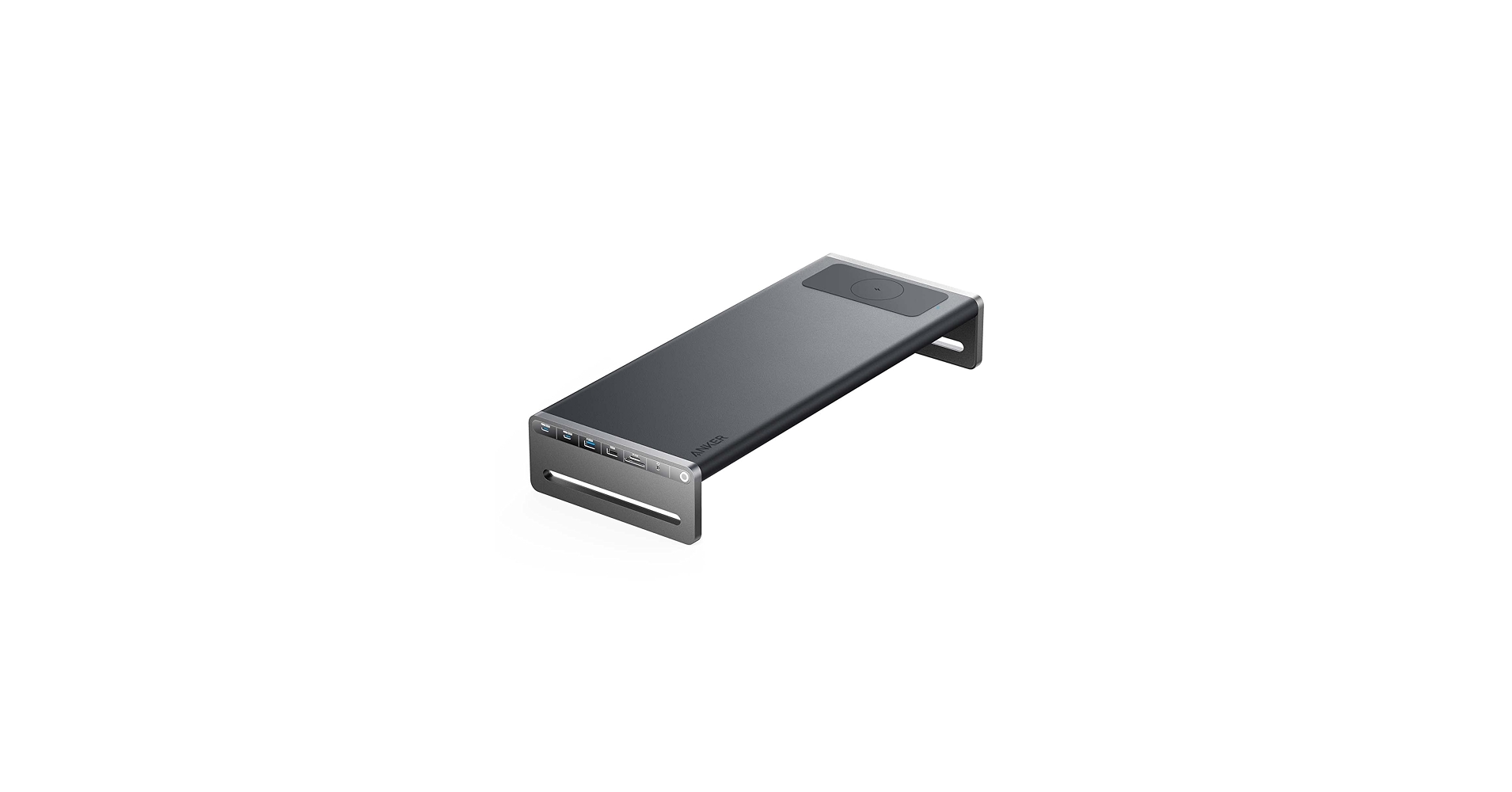
2. Anker 675 USB-C Docking Station (12-in-1, Monitor Stand)
Pros
- Massive 12-port selection including 4K HDMI and Ethernet.
- 100W USB-C Power Delivery can charge most laptops.
- Integrated 10W wireless charging pad.
Cons
- Bulky design takes up more desk space.
- Requires its own external power brick.
The Breakdown: Anker’s 675 is less of a stand and more of a complete docking station that you can put your monitor on. It’s built for pure utility, consolidating nearly every conceivable port, including a Qi charger, into a single, elevated unit. This is the one-and-done solution for complex desk setups.
Key Specs:
- Connectivity: 12 Ports total, including 1x HDMI 4K@60Hz, 1x USB-C (Upstream), 2x USB-C (Data), 4x USB-A, Ethernet, SD/MicroSD, Audio, 10W Qi Charger
- Power Delivery: 100W
- Form Factor: Monitor Riser / Docking Station
- Material: Plastic and Aluminum
- Dimensions: 21.26 x 9.84 x 3.54 inches
The Community Verdict: Market research indicates this is a top choice for those looking to create a single-cable laptop setup. Owners love the sheer number of ports and the robust 100W power delivery. The main criticism is its size and the necessity of a large external power adapter, which can add to under-desk cable clutter.
Dealbreaker: If minimalist design is your absolute top priority, the bulk and mixed-material construction of the Anker 675 might not align with your aesthetic.
3. Satechi USB-C Hub Monitor Stand for Desk w/ NVMe SSD

Pros
- Integrated NVMe/SATA SSD enclosure for blazing-fast storage.
- High-speed 10Gbps USB-A and USB-C ports.
- Robust 100W Power Delivery.
Cons
- Premium price point, and the SSD is sold separately.
- Lacks an Ethernet port for wired internet.
The Breakdown: Satechi takes its classic design and injects it with professional-grade performance. The headline feature is the tool-free M.2 SSD enclosure on the underside, turning the stand into a high-speed drive for backups, scratch disks, or media libraries. This is the ultimate convergence device for creative professionals.
Key Specs:
- Connectivity: 1x USB-C (Upstream), 1x USB-C (10Gbps), 2x USB-A (10Gbps), 1x USB-A (5Gbps), Micro/SD Readers, M.2 NVMe/SATA SSD Enclosure
- Power Delivery: 100W
- Form Factor: Monitor Riser
- Material: Aluminum Alloy
- Dimensions: 15.6 x 9 x 1.7 inches
The Community Verdict: The consensus is that this is a game-changer for workflows that rely on fast external storage. Users report incredible transfer speeds when paired with a quality NVMe drive, effectively eliminating the need for a separate external SSD. The main drawback noted is the high cost of entry once you factor in the price of a good M.2 drive.
Dealbreaker: If you don’t have a need for integrated high-speed storage, you can get similar port functionality for a significantly lower price from other models.
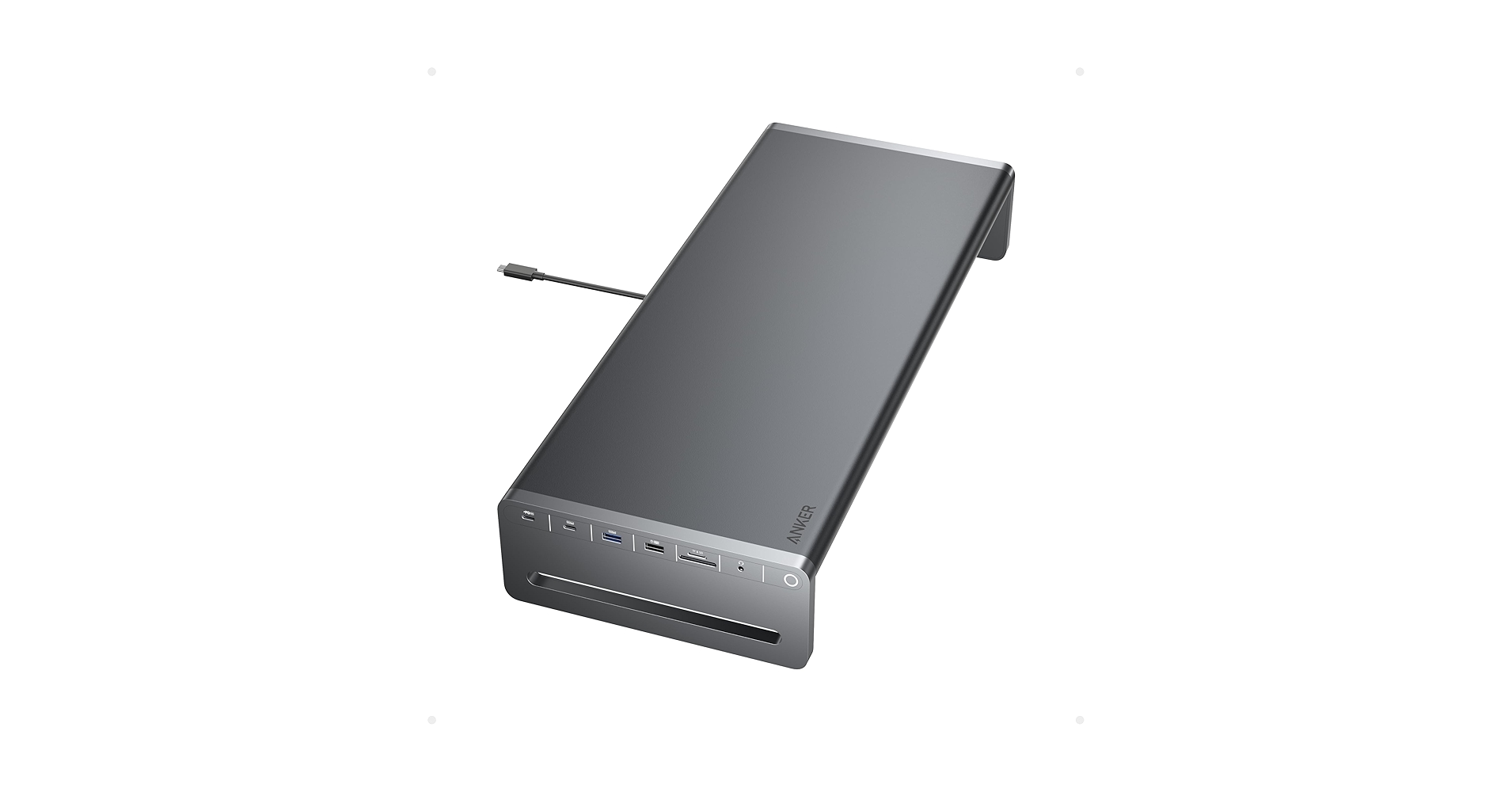
4. Anker USB C Hub, 10-in-1 Aluminum Monitor Stand
Pros
- Excellent balance of ports for most users.
- 100W Power Delivery is strong enough for most laptops.
- Sleek, understated aluminum design.
Cons
- Port speeds are generally 5Gbps, not 10Gbps.
- Design, while clean, is less refined than Satechi models.
The Breakdown: This Anker model is the workhorse of the group, offering a fantastic feature set for its price. It provides the 100W power delivery, 4K HDMI, and Ethernet that power users demand, wrapped in a simple and effective aluminum riser design. It may not have the specialized features of the Satechi SSD stand or the sheer port count of the Anker 675, but it nails the essentials.
Key Specs:
- Connectivity: 10 Ports total, including 1x HDMI 4K@60Hz, 1x USB-C (Upstream), 1x USB-C (Data), 3x USB-A, Ethernet, SD/MicroSD, Audio
- Power Delivery: 100W
- Form Factor: Monitor Riser
- Material: Aluminum
- Dimensions: 15.75 x 9.06 x 1.77 inches
The Community Verdict: Reports suggest this is a reliable, set-it-and-forget-it device. Users appreciate that it just works, providing stable power, display output, and data transfer without fuss. Some owners note that while it’s aluminum, the finish doesn’t feel quite as premium as more expensive competitors.
Dealbreaker: If your workflow involves transferring very large files regularly, the 5Gbps port speeds might become a bottleneck compared to 10Gbps alternatives.
5. AVLT Dual 17″-43″ Monitor Arm Desk Mount with 15-in-1 Hub

Pros
- Full-motion articulation for two large monitors.
- Massive 15-port hub integrated into the base.
- Frees up the entire desk surface under the monitors.
Cons
- Significant desk footprint for the clamp/base.
- Complex installation compared to a simple riser.
The Breakdown: The AVLT arm is in a category of its own, prioritizing ergonomics above all else. Instead of a static riser, you get two fully articulating gas-spring arms that can hold massive monitors, combined with a 15-port docking station built into the desk clamp. This is the ultimate solution for clearing your desk surface and achieving perfect screen positioning.
Key Specs:
- Connectivity: 15 Ports total, including 2x HDMI, 1x DP, 1x USB-C (Upstream), 2x USB-C (Data), 4x USB-A, Ethernet, SD/MicroSD, etc.
- Power Delivery: 100W
- Form Factor: Dual Monitor Arm (Clamp-on)
- Material: Steel and Aluminum
- Monitor Support: Dual screens 17″ to 43″
The Community Verdict: User reports focus on the incredible freedom of movement and the sturdiness of the arms, even with heavy ultrawide monitors. The integrated hub is praised for its comprehensive port selection that supports complex dual-display setups. The primary negative is the lengthy and sometimes difficult setup process.
Dealbreaker: If you only use a single monitor or aren’t comfortable with a more involved, semi-permanent desk installation, this is overkill.
Buying Guide: How to Choose in 2026
Selecting the right monitor stand with a USB-C hub depends on three core factors: your connectivity needs, power requirements, and ergonomic goals.
1. Connectivity: How Many Dongles Do You Want to Kill?
First, audit your peripherals. Do you need an SD card reader for photography? An Ethernet port for stable internet? Multiple high-speed USB-C ports for SSDs? A model like the classic Satechi is perfect for basic needs, while the Anker 675 or AVLT arm are built for users who need to connect everything at once. Don’t pay for ports you’ll never use.
2. Power Delivery: The Single-Cable Dream
Power Delivery (PD) is what allows the stand’s hub to charge your laptop with a single USB-C cable. If you use a lightweight ultrabook like a MacBook Air, 65W might be enough. For more powerful machines like a MacBook Pro or a Dell XPS 15, you should look for 100W PD to ensure it charges effectively under load. Models without PD, like the entry-level Satechi, require you to use your laptop’s original charger separately.
3. Ergonomics and Form Factor
The primary function of a stand is to improve posture. A simple riser is a massive improvement over having a monitor flat on the desk, creating a proper laptop stand for eye level viewing experience. However, for maximum control, a monitor arm like the AVLT is unbeatable. It allows you to precisely control height, depth, and tilt, and it frees up desk space, which is a key tenet for anyone invested in a minimalist cable organizer strategy.
Frequently Asked Questions (FAQ)
1. Will a monitor stand with a USB-C hub work with any laptop?
Generally, yes, if your laptop has a USB-C port that supports DisplayPort Alternate Mode (for video) and Power Delivery (for charging). Most modern laptops from Apple, Dell, HP, and Lenovo do. Always check your laptop’s specifications to confirm its USB-C capabilities.
2. Is 100W Power Delivery necessary for my laptop?
Not always. A 13-inch MacBook Air or similar ultrabook is designed for a ~30-45W charger and will work perfectly with a 65W or 100W hub. However, for a 16-inch MacBook Pro or a powerful gaming laptop that comes with a >100W charger, a 100W hub will charge it, but it may charge slower than its native charger, especially under heavy load.
3. Can I plug a second monitor directly into the stand’s hub?
Only if the hub has a dedicated video output port, such as HDMI or DisplayPort. Many of the stands on this list, like the Anker and AVLT models, have this feature. The more basic Satechi (B07GX3CLKX) does not; it only passes through data.
Read More on TechForDesk
- The 5 Best Clamp On Desk Shelf For Monitors in 2026
- The 5 Best Portable Monitor Riser for Laptops in 2026 (Travel Edition)
- The 5 Best Monitor Stand for College Dorm Desks (2026 Budget Picks)
- The 5 Best Monitor Riser for Neck Pain in 2026: An Ergonomic Guide
- The Best Cable Raceway for Baseboards in 2026: An Aesthetic Guide




