
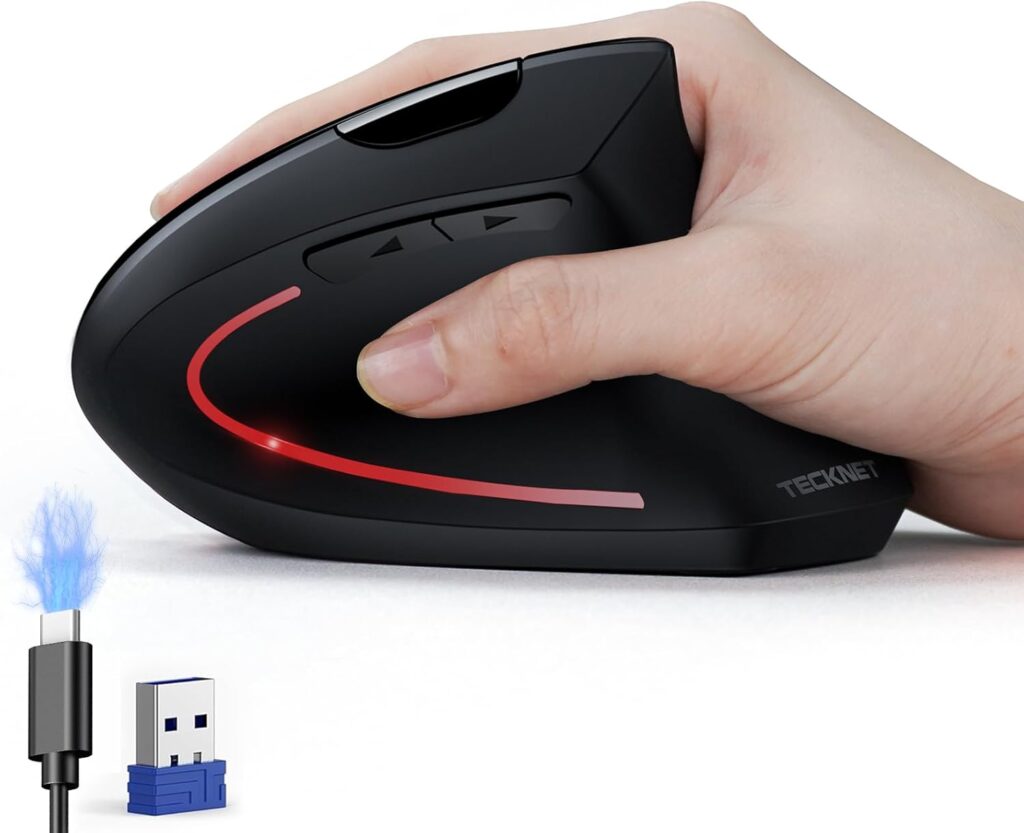
🚀 Quick Verdict / Top Pick
TECKNET Ergonomic Mouse, Wireless Rechargeable
It offers the most sought-after vertical ergonomic design with modern dual-mode wireless and rechargeable features at a price that makes it accessible for anyone to try.
Finding the right mouse for carpal tunnel 2025 is no longer a luxury—it’s an essential investment in your long-term health and productivity. Repetitive strain from traditional mice can lead to significant discomfort. An ergonomic mouse is engineered to place your hand and wrist in a more natural ‘handshake’ position, reducing pressure on the median nerve. This guide breaks down the top options on the market, from classic vertical designs to innovative roller bars, helping you find the perfect fit for your workflow and budget.
| Product | Ergonomic Style | Connectivity | Best For |
|---|---|---|---|
| TECKNET Ergonomic Mouse | Vertical | Wireless (USB/Bluetooth) | Overall Value |
| Ergonomic Keyboard and Mouse Combo | Contoured | Wireless (USB Dongle) | Budget Desk Setups |
| Contour RollerMouse Red | Roller Bar | Wired (USB) | Severe RSI / Professionals |
| Wireless Mouse Pink Ergonomic | Vertical | Wireless (USB/Bluetooth) | Aesthetic-focused Users |
Detailed Reviews
1. TECKNET Ergonomic Mouse, Wireless Rechargeable
Pros
- Rechargeable via USB-C
- Dual connectivity (Bluetooth + 2.4GHz USB)
Cons
- Right-hand only design
- May feel large for very small hands
The Breakdown: The TECKNET vertical mouse represents the perfect entry point into ergonomic peripherals. It provides the essential handshake grip to alleviate wrist pronation without a prohibitive price tag. Its combination of a rechargeable battery and flexible wireless options makes it a modern, convenient choice for any desk setup.
Key Specs:
- Ergonomic Style: Vertical
- Connectivity: Wireless (Bluetooth 5.0/3.0 + 2.4GHz USB Dongle)
- Hand Orientation: Right-Handed
- DPI Levels: 1200 / 1600 / 2000 / 2400
The Community Verdict: Users consistently report a noticeable reduction in wrist strain after a short adjustment period. The dual-connectivity is frequently praised for its versatility between devices. Some market feedback suggests the button placement can take a day or two to become second nature.
Dealbreaker: Skip this if you are left-handed or have exceptionally small hands, as the fixed size and orientation are its main limitations.
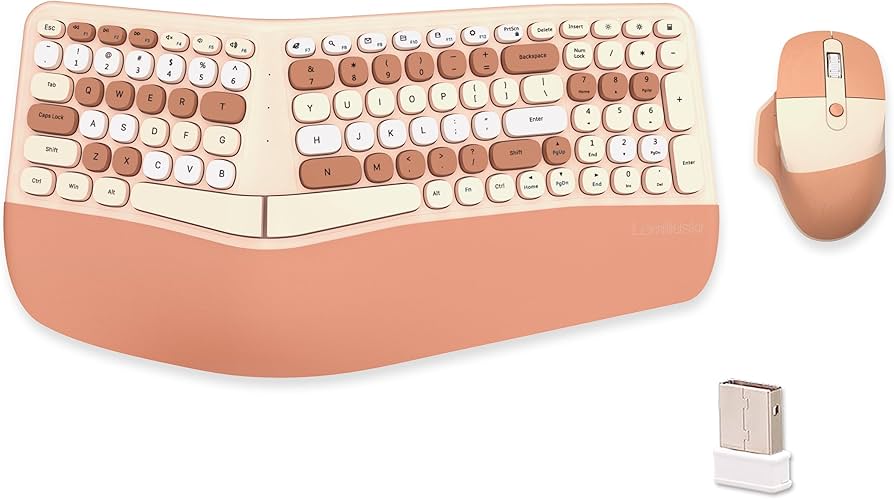
2. Wireless Ergonomic Keyboard and Mouse Combo
Pros
- Excellent value with included keyboard
- Single USB dongle for both devices
Cons
- Mouse is not fully vertical
- Requires disposable batteries
The Breakdown: This combo is a pragmatic solution for overhauling an entire workstation’s ergonomics at once. The mouse offers a comfortable, contoured shape that’s a significant step up from standard flat mice, even if it isn’t a true vertical model. The convenience of a single dongle for both the split keyboard and mouse simplifies setup and saves USB ports.
Key Specs:
- Ergonomic Style: Contoured (Traditional)
- Connectivity: Wireless (2.4GHz USB Dongle)
- Hand Orientation: Right-Handed
- Power: Disposable batteries (not included)
The Community Verdict: Market research indicates that buyers appreciate the value proposition and the immediate comfort improvement from the split keyboard. The mouse is generally considered a solid, if basic, ergonomic upgrade. The primary consensus is that while it provides relief for mild strain, users with more severe symptoms may still need a dedicated vertical mouse.
Dealbreaker: Skip this if you already have an ergonomic keyboard or require the maximum wrist relief that only a vertical or roller bar mouse can provide.
3. Contour RollerMouse Red

Pros
- Keeps hands in a neutral, central position
- Ambidextrous design
Cons
- Significant financial investment
- Steep learning curve
The Breakdown: The RollerMouse is a paradigm shift in cursor control. Instead of moving a mouse with your arm, you control a central roller bar with your fingertips, completely eliminating shoulder, elbow, and wrist movement. This design is engineered for those who have not found sufficient relief from vertical mice and require a top-tier intervention.
Key Specs:
- Ergonomic Style: Roller Bar
- Connectivity: Wired (USB)
- Hand Orientation: Ambidextrous
- Precision: 7SENSES tracking technology
The Community Verdict: Owners report that while the first week of use is challenging, the long-term payoff in pain relief is unparalleled. It is widely regarded as a ‘last resort’ device that truly works. The build quality and precision are consistently cited as being worth the high cost for those who spend all day at a computer.
Dealbreaker: Skip this if you are on a budget, are not prepared for a significant adjustment period, or require a wireless/portable solution.
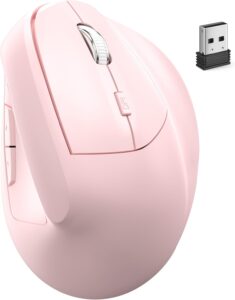
4. Wireless Mouse Pink Ergonomic (Bluetooth+USB)
Pros
- Rechargeable with dual wireless modes
- Unique colorway
Cons
- Niche aesthetic isn’t for everyone
- Long-term durability is less proven
The Breakdown: This mouse proves that ergonomics doesn’t have to be boring. It packs the same core features as our top pick—a vertical design, dual-mode wireless, and a rechargeable battery—into a stylish pink chassis. It’s a fully capable device for combating wrist strain that also serves as a statement piece for a curated desk.
Key Specs:
- Ergonomic Style: Vertical
- Connectivity: Wireless (Bluetooth + 2.4GHz USB Dongle)
- Hand Orientation: Right-Handed
- DPI Levels: 1000 / 1600 / 2400
The Community Verdict: User feedback focuses on the successful combination of function and form. Buyers looking for non-standard tech colors are highly satisfied. The performance is generally reported as solid and reliable for daily office work, mirroring that of other mice in its category.
Dealbreaker: Skip this if you prefer a more traditional, minimalist black or grey peripheral, as the primary selling point here is the unique color.
Buying Guide: How to Choose a Mouse for Carpal Tunnel
Choosing the right ergonomic mouse depends on your specific needs and the severity of your symptoms. Here are the critical factors to consider:
1. Ergonomic Style
Vertical: The most common type. It promotes a ‘handshake’ posture, preventing the forearm twisting (pronation) that strains the wrist. Ideal for most users experiencing mild to moderate discomfort.
Roller Bar: Sits in front of your keyboard. You control the cursor with a cylindrical bar, using minimal hand and arm movement. This is a premium option best for those with severe RSI or who haven’t found relief with other models.
Contoured: A step-up from a basic mouse, it has curves and a thumb rest but doesn’t fully rotate the wrist. A good choice for prevention or for users who find vertical mice too strange.
2. Connectivity
Wireless (USB/Bluetooth): Offers a clean, clutter-free desk and portability. Models with both 2.4GHz USB and Bluetooth are most versatile. The main downside is the need to recharge or replace batteries.
Wired: Provides a stable, lag-free connection with no battery concerns. However, it adds cable clutter to your desk. Often found on high-end, stationary models like the RollerMouse.
3. Hand Orientation
This is non-negotiable. Most ergonomic mice are molded for a specific hand. Ensure you are buying the correct model, as using a right-handed mouse with your left hand will negate all ergonomic benefits.
Frequently Asked Questions
1. How long does it take to get used to a vertical mouse?
The consensus is that the adjustment period is typically between 2 to 7 days. At first, your precision may decrease slightly, but your arm will quickly adapt to the new muscle movements, and it will soon feel natural.
2. Can an ergonomic mouse cure carpal tunnel?
An ergonomic mouse is a tool for management and prevention, not a cure. It can significantly reduce or eliminate pain by removing the stressor causing the inflammation. However, it should be used as part of a broader strategy that may include stretching, breaks, and medical advice.
3. Is a wired or wireless ergonomic mouse better?
Functionally, there is no ergonomic difference. The choice is based on personal preference. Wireless offers a cleaner aesthetic and more freedom of movement, while wired offers simplicity and never needs charging.
Read More on TechForDesk
- Best Under Desk Keyboard Tray Clamp On Models for 2026 (Ergonomic Review)
- The Best Laptop Stand for Eye Level in 2026
- The Best Lumbar Support Pillow for Office Chair Models of 2026
- The Best ZSA Moonlander Alternative in 2026: An Ergonomic Deep Dive
- Finding the Best Tenting Kit for Split Keyboard in 2025




