
🚀 Quick Verdict / Top Pick
KINESIS VIP3 Tenting Accessory

The VIP3 offers the best balance of features for the popular Freestyle2 keyboard, providing three tenting angles and integrated palm supports for immediate ergonomic improvement.
Achieving true ergonomic comfort often goes beyond simply splitting your keyboard. The next critical step is introducing vertical angle, or ‘tenting’. Finding the right tenting kit for a split keyboard allows you to align your wrists and forearms in a more natural, neutral position, reducing strain during long sessions. This guide analyzes the top options available from Kinesis in 2025, helping you select the perfect accessory for your specific ergonomic setup.
| Product | Compatibility | Tenting Angles | Best For |
|---|---|---|---|
| KINESIS VIP3 Accessory | Freestyle2 Keyboards | 5°, 10°, 15° | Freestyle2 Owners |
| KINESIS Lift Kit | Advantage2 Keyboards | 5°, 10°, 15° | Advantage2 Keyboard Users |
| KINESIS V3 Pro Lifters | Freestyle Pro/Edge Keyboards | 5°, 10°, 15° | Freestyle Pro/Edge Owners |
| KINESIS Freestyle2 Keyboard | N/A (Base Keyboard) | Requires VIP3 Kit | Those Needing a Full Setup |
KINESIS Lift Kit for Advantage2
Pros
- Integrated palm supports for maximum comfort
- Stable, custom-fit for the Advantage2 body
Cons
- Only compatible with Advantage2 models
- Palm pads can show wear over time
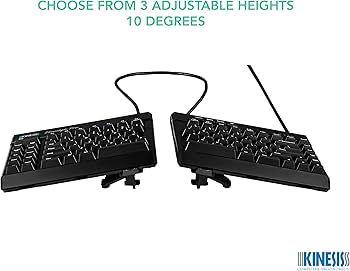
The Breakdown: This kit is designed exclusively for the iconic Kinesis Advantage2 contoured keyboard. Market research indicates that it provides a secure and stable platform for achieving tenting angles of 5, 10, or 15 degrees. The integrated palm supports are a key feature, seamlessly extending the keyboard’s body for enhanced wrist support.
Key Specs:
- Compatibility: Kinesis Advantage2 Keyboards (All Models)
- Tenting Angles: 5°, 10°, 15°
- Palm Support: Integrated with thick pads
- Installation: Snap-on
The Community Verdict: Users consistently report that this kit is a ‘must-have’ for the Advantage2, transforming it into a truly personalized ergonomic tool. The consensus is that installation is simple and the resulting stability is excellent. Some long-term users note that the palm pads can eventually wear down, but replacements are available.
Dealbreaker: Skip this if you own any keyboard other than a Kinesis Advantage2; it simply will not fit.
KINESIS VIP3 Tenting Accessory for Freestyle2
Pros
- Easy, tool-free installation and adjustment
- Includes comfortable, integrated palm supports
Cons
- Only works with Freestyle2 models
- Adds significant bulk to the keyboard’s footprint
The Breakdown: The VIP3 (V-Lifter and Integrated Palm Supports) is a comprehensive accessory designed to convert a flat Freestyle2 into a fully adjustable ergonomic keyboard. Market analysis shows this is the most popular add-on for the Freestyle2 line due to its ease of use. It offers three distinct tenting angles without requiring any complex setup.
Key Specs:
- Compatibility: Kinesis Freestyle2 Keyboards (All Models)
- Tenting Angles: 5°, 10°, 15°
- Palm Support: Integrated with cushioned pads
- Installation: Clips onto the base of the keyboard
The Community Verdict: Owners report that the VIP3 kit feels sturdy and makes an immediate, positive difference in wrist comfort. The simplicity of switching between the three angles is a frequently praised feature. A common critique is that the combined unit becomes quite large, taking up considerable desk space.
Dealbreaker: Skip this if you have a Freestyle Pro or Edge model, as the mounting points are different.
KINESIS AC930 V3 Pro Lifters
Pros
- Quick and simple snap-on installation
- Keeps keyboard footprint relatively small
Cons
- Does not include palm supports (sold separately)
- Can feel less stable at 15° than all-in-one kits
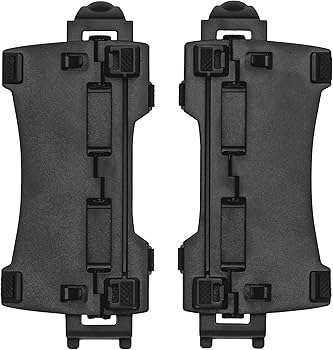
The Breakdown: This is a la carte tenting for the premium Freestyle Pro and Edge keyboards. The V3 Pro Lifters provide the same three angles as other kits but do so in a more compact, modular fashion. This approach allows users to add tenting without being forced to use the integrated palm supports if they have their own solution or prefer none.
Key Specs:
- Compatibility: Freestyle Pro & Freestyle Edge RGB keyboards
- Tenting Angles: 5°, 10°, 15°
- Palm Support: Not included (Requires separate purchase of palm supports)
- Installation: Snap-on
The Community Verdict: Users appreciate the ability to add tenting without increasing the keyboard’s depth with palm rests. The installation is reported to be effortless. However, some feedback suggests that at the highest 15-degree angle, the keyboard can feel slightly less planted than the VIP3 kit on the Freestyle2.
Dealbreaker: Skip this if you want an all-in-one solution with included palm supports; you’ll need to buy those separately.
KINESIS Freestyle2 USB-A Ergonomic Keyboard
Pros
- Excellent entry point into split keyboards
- Fully compatible with VIP3 tenting accessory
Cons
- Does not include a tenting kit by default
- Membrane keys, not mechanical
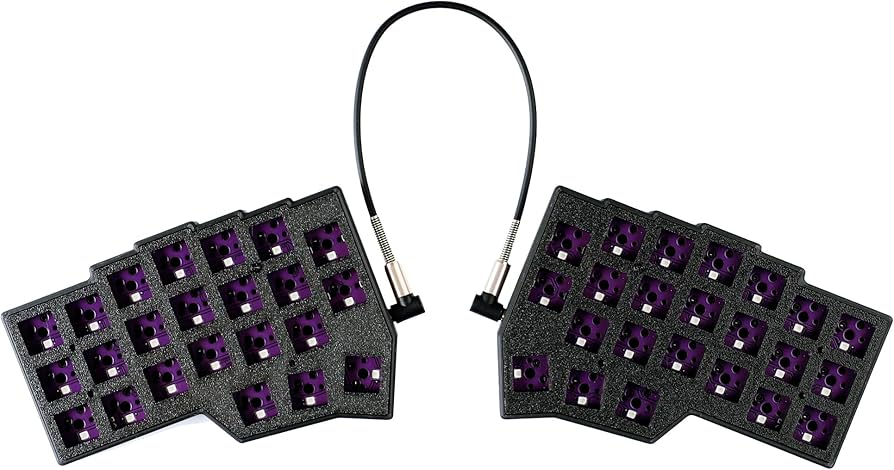
The Breakdown: While not a tenting kit itself, the Freestyle2 is the foundational platform for our top-pick accessory. This keyboard provides up to 9 inches of separation between modules, allowing users to position them at shoulder-width. It’s a reliable, low-profile membrane keyboard that serves as the perfect canvas for adding tenting via the VIP3 kit when you’re ready.
Key Specs:
- Compatibility: Base keyboard for VIP3 Tenting Accessory
- Key Switch Type: Low-force membrane switches
- Separation: 9 inches (20-inch option available)
- Palm Support: Not included (Comes with VIP3 Kit)
The Community Verdict: This keyboard is widely regarded as one of the best starting points for anyone exploring ergonomic peripherals. Owners report a comfortable typing experience and appreciate the modular design that allows for upgrades. The primary criticism is the lack of mechanical switches, which enthusiasts may miss.
Dealbreaker: Skip this if you are looking for a mechanical keyboard or an all-in-one package with tenting included out of the box.
How to Choose a Tenting Kit for Your Split Keyboard
Choosing the right tenting kit is less about which is ‘best’ and more about which is ‘correct’ for your gear. Here’s a minimalist approach to making the right choice:
1. Verify Keyboard Compatibility
This is the most critical step. A tenting kit for an Advantage2 will not work on a Freestyle2, and vice-versa. The kits are custom-molded to the specific shape and mounting points of their intended keyboard model. Always double-check that the kit you’re buying explicitly lists your keyboard model as compatible.
2. Assess Your Angle Needs
All the Kinesis kits reviewed here offer the same 5, 10, and 15-degree angles. For most users, this range is more than sufficient. Market research indicates that most people find their sweet spot at 10 or 15 degrees. Starting at the lowest angle and gradually increasing it over a week is a common recommendation to allow your muscles to adapt.
3. Decide on Palm Supports
Do you want an all-in-one solution or a more modular setup? The VIP3 (for Freestyle2) and Lift Kit (for Advantage2) integrate palm supports directly. The V3 Pro Lifters (for Freestyle Pro/Edge) do not, requiring a separate purchase. If you already have a preferred wrist rest solution or want to minimize desk footprint, the modular lifters are the superior choice.
Frequently Asked Questions
What exactly is keyboard tenting?
Keyboard tenting is the ergonomic practice of raising the inner edges of a split keyboard. This creates a tent-like shape that allows your hands, wrists, and forearms to rest in a more natural, neutral ‘handshake’ posture, reducing pronation and potential strain.
Do I need a tenting kit for my split keyboard?
While not strictly necessary, a tenting kit is highly recommended to unlock the full ergonomic potential of a split keyboard. A split keyboard solves for ulnar deviation (angling wrists outward), while tenting solves for forearm pronation (twisting forearms inward). Combining both provides the most comprehensive ergonomic benefit.
Can I use these kits with other brands like ZSA or Keychron?
No. The Kinesis tenting accessories reviewed here are designed with specific mounting systems for Kinesis-brand keyboards only. They are not universal and will not be compatible with keyboards from other manufacturers.
Read More on TechForDesk
- The Best Split Keyboard for Programming in 2026: A Pro’s Guide
- The 4 Best Adjustable Footrest for Short Legs in 2025
- The Best Foot Rest for Standing Desk Sitting (2026 Review)
- Best Extra Thick Anti Fatigue Mat for Back Pain in 2025: TechForDesk Reviews
- The 4 Best Anti Fatigue Mat for Standing Desks in 2025




