
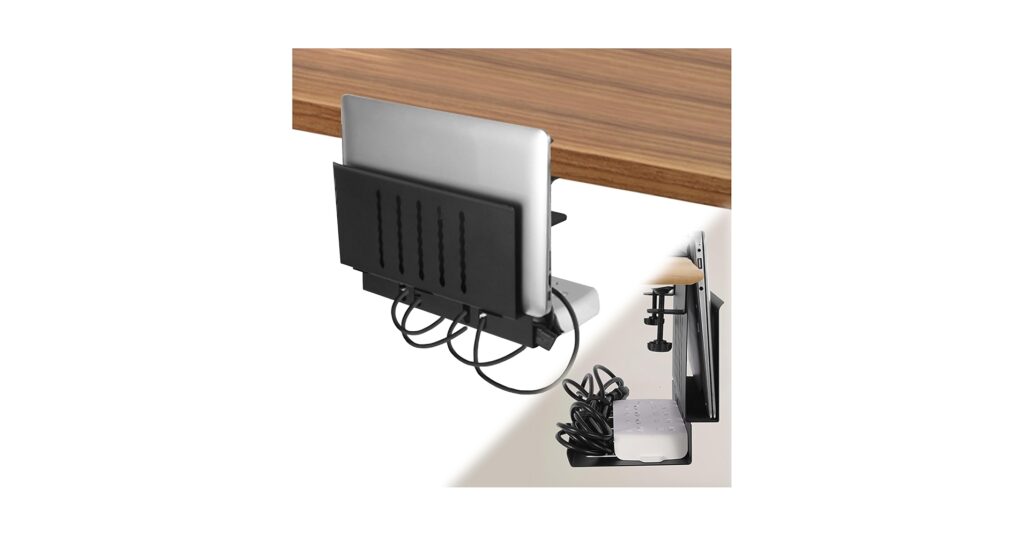
🚀 Quick Verdict / Top Pick
IFCASE 2 Tier Under Desk Laptop Mount

Its dedicated two-tier design provides a perfect, integrated solution for both laptop storage and comprehensive cable management, directly addressing the core user need.
In 2026, the minimalist, high-tech workspace is no longer an option—it’s the standard. Reclaiming your desk surface is the first step, and the right under desk laptop mount with cable tray is the key. This single piece of hardware solves two of the biggest clutter problems: where to store your laptop when not in use, and how to tame the spaghetti monster of cables. Market research indicates a growing demand for these integrated solutions as hybrid work models solidify. We’ve analyzed the top options to help you find the perfect match for your setup, from drill-free clamps to robust, multi-tier shelves.
Comparison Table 2026
| Product | Installation Method | Mount Type | Best For |
|---|---|---|---|
| IFCASE 2 Tier Mount | Screw-in (Drill) | Integrated 2-Tier Shelf | All-in-One Solution |
| VIVO Clamp-on Tray | Clamp-on (No-Drill) | Rotating Laptop Tray | Ergonomics & Flexibility |
| LUKETURE Side Storage | Clamp-on (No-Drill) | Side Desk Pocket | Quick Access & Simplicity |
| No-Drill Cable Tray | Clamp-on (No-Drill) | Cable Tray Only | Modular Cable Management |
| MOUNT-IT! Cable Tray | Screw-in (Drill) | Cable Tray Only | Heavy-Duty Cable Management |
Product Reviews
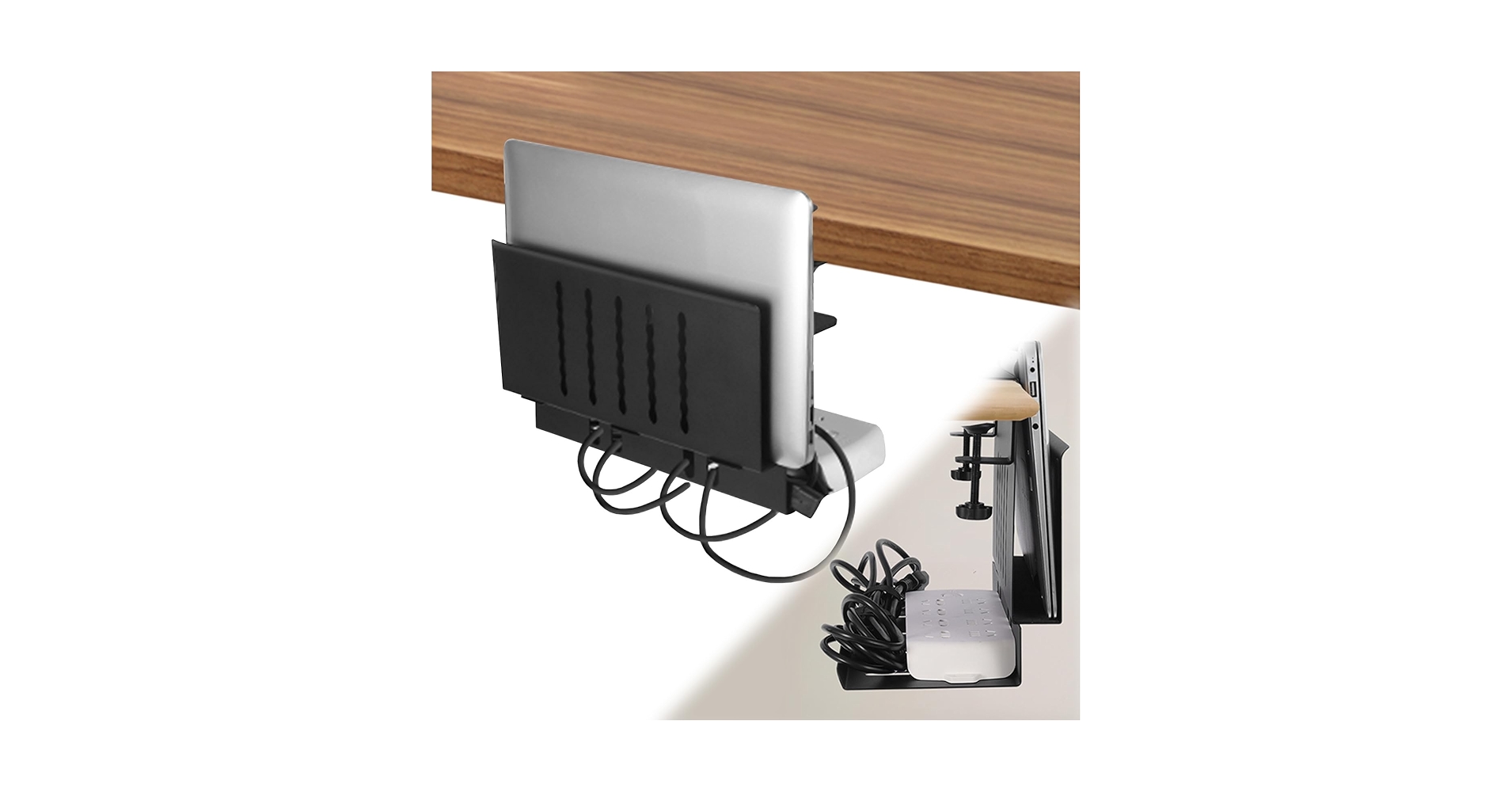
1. LUKETURE Desk Side Storage, Laptop Holder
Pros
- Tool-free, clamp-on installation
- Multiple compartments for accessories
Cons
- Not a true ‘under desk’ solution
- Limited capacity for large power bricks
The Breakdown: The LUKETURE opts for convenience over concealment, offering a side-saddle approach to desk storage. It clamps easily onto the edge of your desk, providing a felt-lined pocket for your laptop and additional slots for notebooks or tablets. While it doesn’t hide cables underneath, its small compartments can serve as a basic cable tray for chargers and phone cords.
Key Specs:
- Installation Method: Clamp-on (No-Drill)
- Mount Type: Side Desk Pocket
- Material: Steel and Felt
- Desk Thickness Compatibility: Up to 2 inches
The Community Verdict: Users consistently praise its easy installation and the convenience of having their laptop immediately accessible. However, the consensus is that it’s more of a quick-stow solution than a comprehensive organization system. Some report the clamps can loosen over time with heavy use.
Dealbreaker: Skip this if you need to manage a complex web of monitor cables, docking station wires, and power strips; its capacity is strictly for light-duty organization.
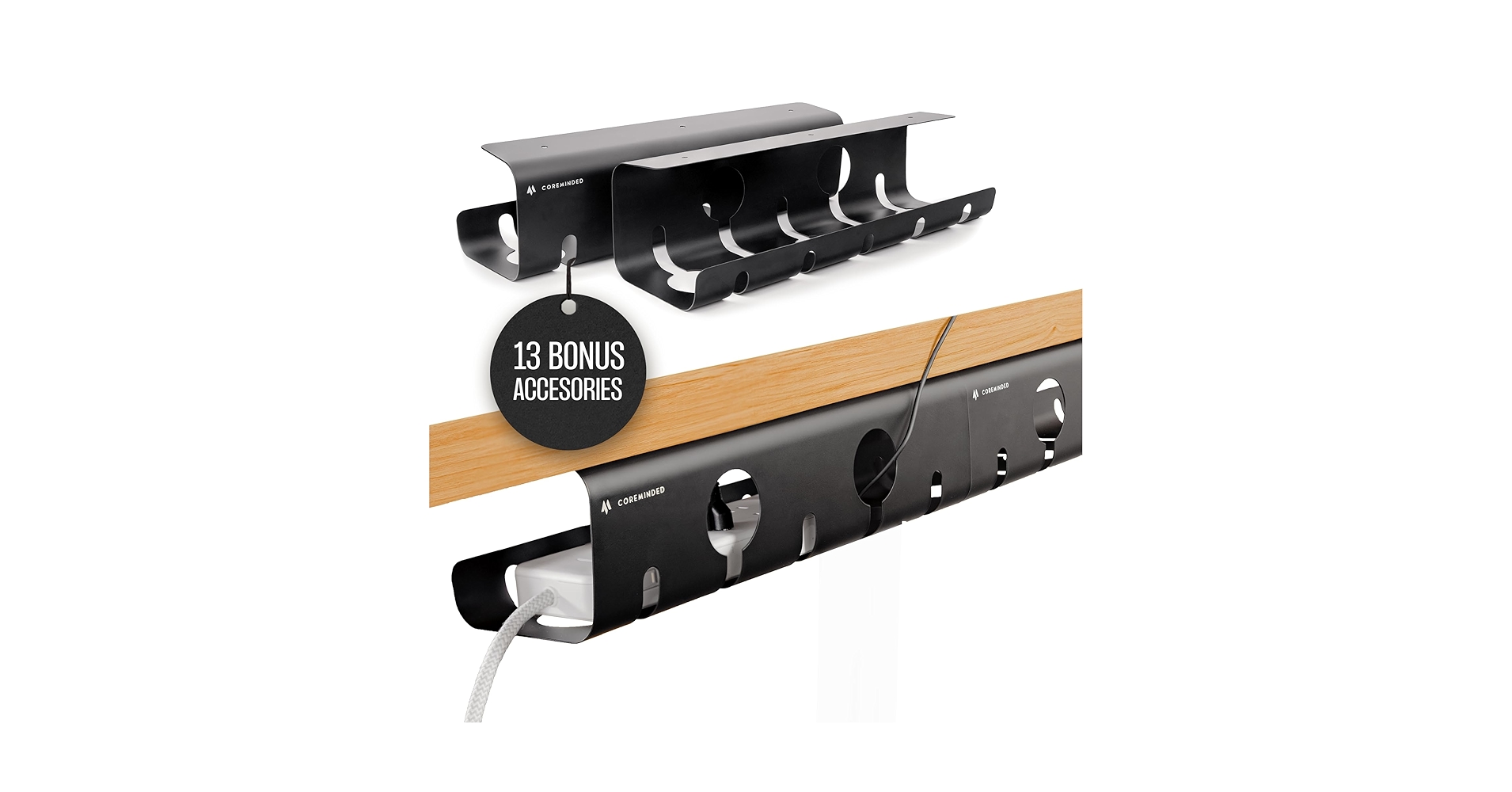
2. No-Drill Under Desk Cable Management Tray
Pros
- Completely drill-free clamp system
- Large capacity for multiple power bricks
Cons
- Does not hold a laptop
- Clamps may be bulky for thin desks
The Breakdown: This product focuses on doing one thing exceptionally well: managing cables without drilling holes. It uses a robust C-clamp system to attach a spacious wire basket underneath your desk. This is a modular approach, perfect for pairing with a separate vertical laptop stand on your desktop or a different under-desk holder.
Key Specs:
- Installation Method: Clamp-on (No-Drill)
- Mount Type: Cable Tray Only
- Material: Powder-Coated Steel
- Capacity/Dimensions: 15.7 x 4.7 inches (per tray)
The Community Verdict: Market research indicates this is a favorite for renters or owners of expensive desks who refuse to drill. Owners report that the dual-pack offers excellent value and can handle even the most complex setups with multiple monitors and peripherals. A few users note that the clamp pads could be of higher quality.
Dealbreaker: If your goal is an all-in-one mount for both your laptop and cables, this isn’t it—it only solves half of the equation.
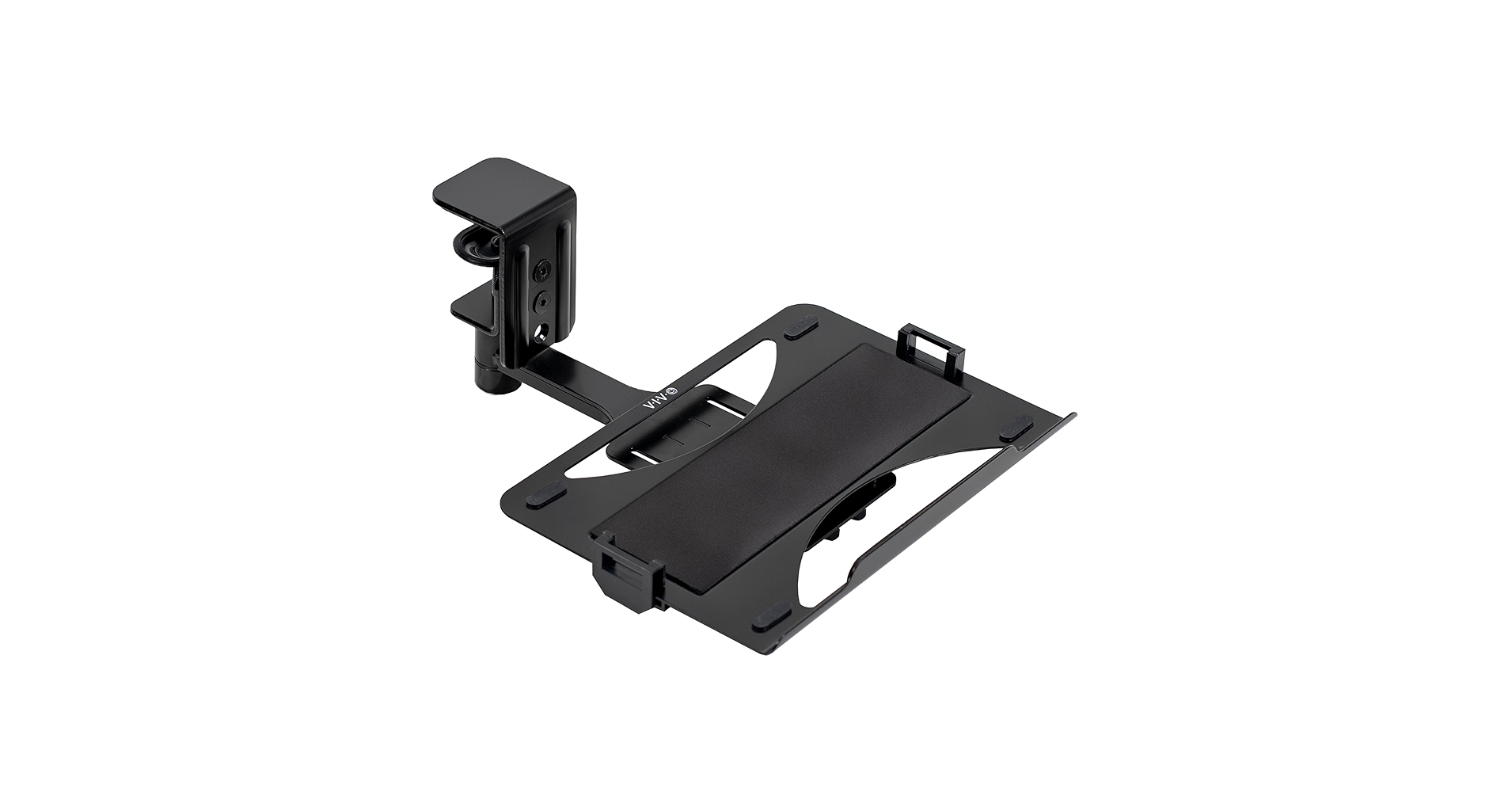
3. VIVO Clamp-on Rotating Laptop Tray
Pros
- Full 360-degree rotation
- Damage-free clamp installation
Cons
- No dedicated cable management tray
- Tray size might not fit oversized gaming laptops
The Breakdown: VIVO’s solution prioritizes ergonomics and flexibility. This isn’t just for storage; it’s a dynamic platform that can hold your laptop as a secondary screen, swinging it into position when needed and tucking it away neatly. While it lacks a separate tray for cables, the main platform is large enough to hold a power brick and coiled wires alongside the laptop.
Key Specs:
- Installation Method: Clamp-on (No-Drill)
- Mount Type: Rotating Laptop Tray
- Capacity/Dimensions: 12 x 9 inch tray, holds up to 8.8 lbs
- Rotation: 360 degrees
The Community Verdict: Owners love the smooth rotation and solid build quality, often highlighting its usefulness in sit-stand desk setups. The main criticism is the lack of integrated cable clips or channels, which can lead to dangling wires if not managed separately. The consensus is that it’s a premium laptop holder first and a storage solution second.
Dealbreaker: Skip this if your primary goal is hiding a mess of cables; this mount is designed to present your laptop, not conceal your clutter.
4. IFCASE 2 Tier Under Desk Laptop Mount (Top Pick)
Pros
- True integrated laptop and cable tray design
- Sturdy, high-capacity steel construction
Cons
- Requires drilling for installation
- Fixed position lacks adjustability
The Breakdown: This IFCASE mount is the most direct answer to our keyword. Its smart two-tier design allocates a sleek, padded shelf for your laptop and a second, equally spacious shelf below for power bricks, docking stations, and excess cables. By requiring screws, it ensures a rock-solid installation that can hold significant weight without worry.
Key Specs:
- Installation Method: Screw-in (Drill)
- Mount Type: Integrated 2-Tier Shelf
- Capacity/Dimensions: Fits laptops up to 16 inches, 16.5 x 11.8 inch total footprint
- Material: Alloy Steel
The Community Verdict: Users report extreme satisfaction with how much clutter this single unit eliminates. The stability is a frequently mentioned positive, with many trusting it to hold expensive work laptops and heavy docking stations. The only consistent negative is the installation, which requires confidence with a drill and careful measurement.
Dealbreaker: If you are unwilling or unable to drill into your desk surface, this product is a non-starter.
5. MOUNT-IT! Under Desk Cable Tray

Pros
- Extra-long 23-inch design
- Open wireframe for easy access and airflow
Cons
- Requires drilling for installation
- Does not hold a laptop
The Breakdown: Similar to the other cable-only option, the MOUNT-IT! tray is a specialized tool. However, it’s built for permanent, heavy-duty applications with its screw-in design and massive 23-inch length. This is the kind of tray you install once to manage the power and data for a triple-monitor setup, PC, and all related peripherals.
Key Specs:
- Installation Method: Screw-in (Drill)
- Mount Type: Cable Tray Only
- Capacity/Dimensions: 23.6 x 4.5 inches
- Material: Steel
The Community Verdict: This is highly regarded in the PC building and home office communities for its sheer size and stability. Owners report that it can easily hold two large power strips side-by-side. The open design is also praised for preventing power bricks from overheating.
Dealbreaker: This is overkill for a simple laptop-and-monitor setup and, like the IFCASE, requires permanent modification to your desk.
Buying Guide: How to Choose in 2026
Choosing the right under desk laptop mount with cable tray comes down to three key factors:
1. Installation: Drill vs. No-Drill
This is the first and most important decision. If you have a desk you can’t or won’t drill into (renting, antique wood, glass top), your options are limited to clamp-on models like the VIVO Rotating Tray or the LUKETURE Side Storage. If you want maximum stability and a permanent solution, a screw-in model like the IFCASE 2 Tier is the superior choice.
2. Function: Integrated vs. Modular
Do you want one product that does it all, or do you prefer specialized components? An integrated solution like the IFCASE is simple and efficient. A modular approach—combining a dedicated laptop holder with a separate cable tray like the No-Drill Tray—offers more flexibility in placement. This modularity extends to your entire desk; you might pair your new mount with a specific under desk keyboard tray clamp on for a fully ergonomic, clutter-free setup.
3. Workspace Philosophy: Conceal vs. Access
Is your goal to hide everything for a perfectly clean aesthetic, or to have quick access to your gear? Under-desk shelves are great for concealment, while a side-mount or rotating tray prioritizes accessibility. Creating the perfect workspace is about more than just hiding wires; it’s about comfort and efficiency. You may also want to consider an ergonomic wrist rest for your mouse to complete your setup. And once the functional items are in place, don’t forget that even a minimalist desk can have personality with a few select Kawaii desk accessories.
Frequently Asked Questions
Q: Will an under desk mount fit my thick desk?
A: It depends on the model. Clamp-on mounts have a maximum thickness, typically around 2-2.5 inches. Always measure your desk thickness before buying a clamp-on model. Screw-in models will work with any desk material that can safely accept screws (wood, MDF, etc.), regardless of thickness.
Q: Can these mounts cause laptops to overheat?
A: It’s unlikely. Most mounts are made of metal or have a ventilated design that allows for passive airflow. For intensive tasks, it’s always best to ensure your laptop is fully asleep or shut down before stowing it, but for simple storage, overheating is not a common issue.
Q: Can I use these mounts to hold things other than a laptop?
A: Absolutely. Many users repurpose these mounts to hold docking stations, tablets, Mac Minis, external hard drives, or even small audio interfaces. Just be mindful of the weight capacity and dimensions listed by the manufacturer.




